
Material Symbols
by Google
Google's Apache-2.0 icon set, served as a variable icon font, with the official Google Design MCP.
Icons Libraryoutlinefilled
1. Price: fonts.google.com/icons
Free.
fonts.google.com/iconsNo quote yet: price is read from the official pages.
2. Commercial use: github.com/google/material-design-icons
“We have made these icons available for you to incorporate into your products under the Apache License Version 2.0.”
Apache License 2.0 allows use in paid products.
github.com/google/material-design-icons3. Credit the author: github.com/google/material-design-icons
“We'd love attribution in your app's about screen, but it's not required.”
No credit on screen. Keep the license notice inside the code you ship.
github.com/google/material-design-icons4. Agent access: developers.google.com/design-mcp/reference/mcp
There is no package or API. Files are downloaded by hand from the official site.
developers.google.com/design-mcp/reference/mcpLicense checked Nov 9, 2026 against 2 official pages. Tap a verdict to see its source. How we checked Report an error
Material Symbols: Google's free icons you can fine-tune
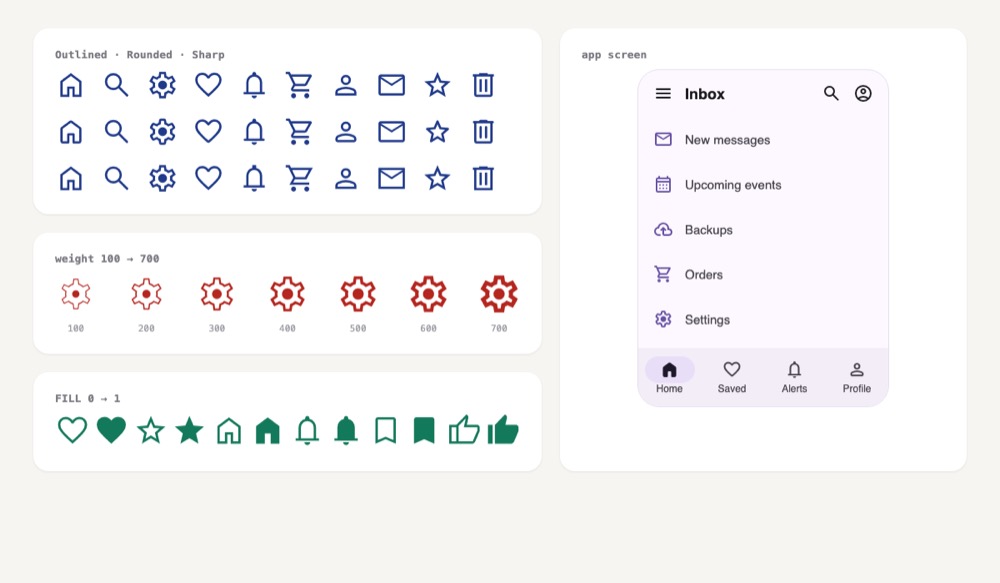
Material Symbols is Google's free set of icons, such as home, search or settings, all in one matching style. They come as a font, so you type an icon's name, like "home", and the page shows the icon. You can switch each icon between outline and filled, thin and bold, and three corner styles.
Where you can use it
Menus and toolbars in a web app
Put icons in a sidebar, a top bar or buttons by typing their names. Loading only the icons you use keeps the page fast.
Show what is selected
Fill the icon of the open tab in a bottom bar, or a heart once something is saved, while the others stay as outlines.
Icons on a dark theme
Make icons slightly thinner on dark backgrounds so they do not glare, or bolder to stress one action, without changing their size.
Android and iPhone apps and mockups
Use the same icons in a phone app and in design mockups, so the app, the website and the designs match.
Icons served from your own site
Keep the icon font on your own server, for example for an internal tool, so you decide when it changes and visitors do not contact Google.
Let an AI assistant pick icons
Google runs a free design service for AI assistants that turns words like "save" or "storage" into matching icon names.
As reported by Google: Over 2,500 icons in one font file (guide summary); The default font link loads 3,800+ icons, as the same guide says further down; Default font 295 KB; Three named icons only, 1.7 KB.
Material Symbols popularity
How to start
Tell your AI assistant
“Use Material Symbols Rounded from Google Fonts with icon_names listing only the icons we use, sorted A to Z, and display=block; fill the icon of the active tab with font-variation-settings 'FILL' 1 and give icon-only buttons an aria-label.”
Show codeStep 1 or Step 2
Add one line to the page head to load the icon font from Google Fonts (add &icon_names=... to load only the icons you use).
<link href="https://fonts.googleapis.com/css2?family=Material+Symbols+Outlined" rel="stylesheet" />Put the icon name, with underscores instead of spaces, inside an element with the matching class.
<span class="material-symbols-outlined">arrow_forward</span>Mistakes to avoid
<link href="https://fonts.googleapis.com/css2?family=Material+Symbols+Outlined" rel="stylesheet" /> in productionThe plain link loads every icon; the guide lists 295 KB versus 1.7 KB for three icons.
<span class="material-icons">home</span> with the classic Material Icons font in a new project<span class="material-symbols-outlined">home</span> with Material SymbolsThe classic set gets no new icons.
The font only turns exact snake_case names into icons; anything else shows as text.
The default link is a static font with fill 0, so the fill setting has no effect.
npm install material-symbols as if it were Google's packageGoogle does not publish or check those packages.
License
Apache-2.0 license. Free under the Apache License 2.0, also in paid apps, and you may change and re-share the icons. A visible credit is welcome but not required. Keep the license text with copies of the files you pass on.
“We have made these icons available for you to incorporate into your products under the Apache License Version 2.0.” github.com/google/material-design-icons
“We'd love attribution in your app's about screen, but it's not required.” github.com/google/material-design-icons
“We have made these icons available for you to incorporate into your products under the Apache License Version 2.0.” github.com/google/material-design-icons
“Feel free to remix and re-share these icons and documentation in your products.” raw.githubusercontent.com
AllowedWith conditionsNot allowedNot stated or not checked yet
Is Material Symbols free for commercial use? The full answer Not legal advice. Check the license page before you ship.
For your agent
License rules tell your agent what it may do with Material Symbols. Paste them into your prompt or AGENTS.md.
- Material Symbols (Icons). Google's Apache-2.0 icon set, served as a variable icon font, with the official Google Design MCP. Price: free; commercial use OK; no credit needed. Style: outline, filled.
  Connect: official MCP server https://design.googleapis.com/mcp.
  Get files: Google Fonts link (recommended), repo font/variablefont folders, community npm packages, or the Design MCP at https://design.googleapis.com/mcp (search_icons, icons_instructions) (svg, variable font).
  Not allowed: Material Icons (classic) is no longer updated; use Material Symbols
  Not allowed: Design MCP needs Google Cloud authentication; Google does not vet community npm packages
  Rule: Use Material Symbols; classic Material Icons are no longer updated.
License: https://github.com/google/material-design-icons (checked 2026-11-09; details: https://agentgid.com/assets/material-symbols/)Agent calls a free official API or MCP.
Formats: svg, variable font
https://design.googleapis.com/mcpIcons: Material Symbols by Google (Apache License 2.0)Alternatives
Material Symbols This page
Pick Lucide when you want simple line icons as separate React, Vue or Svelte pieces instead of one icon font.
Pick Phosphor when you want each icon in six weights from ready packages for React, Vue and the web.
Material Design Icons (Pictogrammers)
Pick the Pictogrammers set when you want a larger community icon set in the Material style as image files, a web font or code packages.
MIT-licensed SVG icons from Tailwind Labs (324 per style in heroicons 2.2.0) with React and Vue packages.
6,287 MIT icons (5,233 outline and 1,054 filled) as SVG, webfont and framework packages.
Questions
Can I use Material Symbols in a paid app?
Yes. Google offers them under the Apache License 2.0 for use in your products; a credit is welcome but not required.
What is the difference from Material Icons?
Material Symbols is the current set from April 2022, built as an adjustable font. Material Icons is the classic set and gets no updates.
Is there a filled version?
Yes. There is no separate filled font; every style can be filled with the fill setting, from 0 (outline) to 1 (filled).
Why do I briefly see words like "home" instead of icons?
The text shows until the font loads. Add display=block to the font link, as the guide asks.
Does it work in Flutter apps?
Not yet; the guide says Flutter support is planned. Web, Android and iOS formats are available.