
Bootstrap Icons
by Bootstrap team
2,078 MIT icons (bootstrap-icons 1.13.2) as SVG, sprite and icon font.
Icons Code libraryoutlinefilled
1. Price: icons.getbootstrap.com
Free.
icons.getbootstrap.comNo quote yet: price is read from the official pages.
2. Commercial use: LICENSE on GitHub
“to deal in the Software without restriction, including without limitation the rights to use, copy, modify, merge, publish, distribute, sublicense, and/or sell copies of the Software”
MIT allows use in paid and company products.
LICENSE on GitHub3. Credit the author: LICENSE on GitHub
No credit on screen. Keep the license notice inside the code you ship.
LICENSE on GitHub4. Agent access: github.com/twbs/icons
An agent can install it by itself with npm install bootstrap-icons. No key or account is needed.
github.com/twbs/iconsLicense checked Nov 9, 2026 against 1 official page. Tap a verdict to see its source. How we checked Report an error
Bootstrap Icons: free icon set for any website
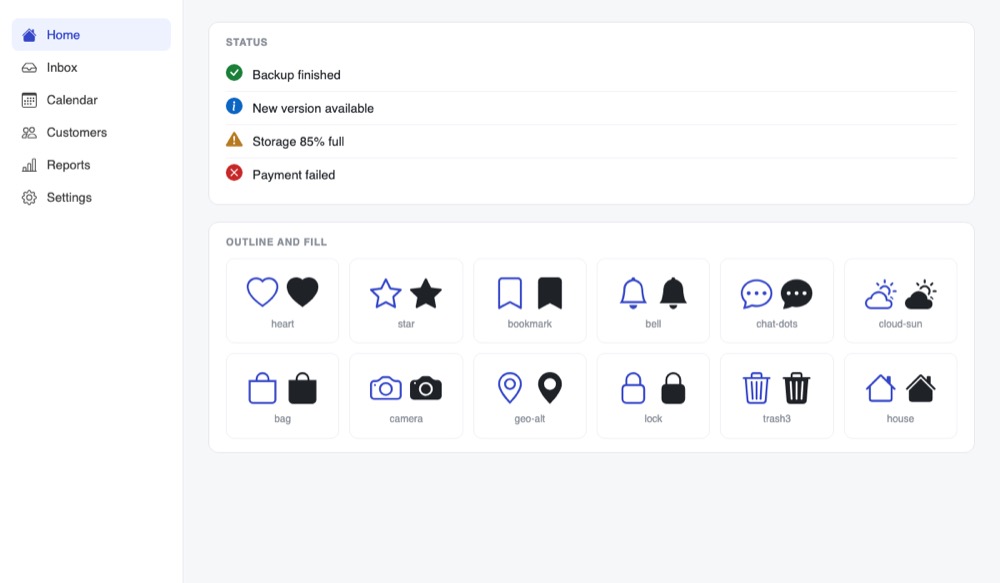
Bootstrap Icons is a free set of over 2,000 small icons, from arrows and bells to weather and brand logos, made by the team behind the Bootstrap website toolkit. Many icons come in an outline and a filled version. You can use them with or without Bootstrap, as separate image files, one combined file, or an icon font, and in paid products.
Where you can use it
Icons on a Bootstrap site
Add an icon next to a button or a heading with one short tag. The icon takes the size and color of the text around it.
Icons pasted into the page
Put the icon drawing straight into the page or component, so it needs no extra file and stays sharp at any size. This works in any site, not only Bootstrap ones.
Many icons from one file
On a page with lots of icons, load one combined file from your own site and point to each icon by its name.
Icons inside a style sheet
Use an icon as a background picture in your styles, for example a small check mark in front of list items.
Status messages with clear signs Idea
Mark messages in an admin panel or an app with a green check, a blue info sign, a yellow warning or a red cross, using the filled icons.
Sidebar menu of an admin panel Idea
Give every section of a dashboard menu its own icon, such as home, inbox, calendar and settings, with a filled icon for the page that is open.
As reported by Bootstrap team: over 2,078 icons.
Bootstrap Icons popularity
Downloads from api.npmjs.org, stars from GitHub, checked Nov 26, 2026. How the Gid Score is calculated
How to start
Tell your AI assistant
“Add Bootstrap Icons 1.13.2 from npm, paste the house, inbox, calendar3 and gear icons into the sidebar as inline drawings with aria-hidden="true", and put an aria-label on every icon-only button.”
Or install it yourself. Composer and a download archive are other options.
npm i bootstrap-iconsShow codeStep 1 or Step 2
For the quickest start, link the icon font style sheet at a fixed version and use an icon by its class name.
<link rel="stylesheet" href="https://cdn.jsdelivr.net/npm/bootstrap-icons@1.13.2/font/bootstrap-icons.min.css">Or paste one icon's drawing straight into the page; a width and height of 1em make it scale with the text.
<svg xmlns="http://www.w3.org/2000/svg" width="1em" height="1em" fill="currentColor" class="bi bi-heart-fill" viewBox="0 0 16 16" aria-hidden="true">
  <path d="M4 1c2 0 3 1.5 4 3 1-1.5 2-3 4-3 2.5 0 4 2 4 4.5 0 3-2.5 5.5-8 9.5C2.5 11 0 8.5 0 5.5 0 3 1.5 1 4 1"/>
</svg>
Mistakes to avoid
<use href="https://cdn.jsdelivr.net/npm/bootstrap-icons/bootstrap-icons.svg#heart"> from another domainBrowsers can block a sprite loaded from another domain, so the icons stay blank.
<button><svg aria-label="Mute">...</svg></button><button type="button" aria-label="Mute"><svg class="bi" aria-hidden="true">...</svg></button>For an icon-only button the name belongs on the button, and the icon inside is hidden from screen readers.
The docs give a versioned link, so an update cannot change your icons without notice.
Unescaped URL characters break the background image.
Some Sass setups cannot resolve the package's relative font paths.
License
MIT license. Free in personal and paid products, with no visible credit needed. Keep the copyright and license notice with copies of the icon files.
“to deal in the Software without restriction, including without limitation the rights to use, copy, modify, merge, publish, distribute, sublicense, and/or sell copies of the Software” LICENSE on GitHub
“to deal in the Software without restriction, including without limitation the rights to use, copy, modify, merge, publish, distribute, sublicense, and/or sell copies of the Software” LICENSE on GitHub
“to deal in the Software without restriction, including without limitation the rights to use, copy, modify, merge, publish, distribute, sublicense, and/or sell copies of the Software” LICENSE on GitHub
AllowedWith conditionsNot allowedNot stated or not checked yet
Is Bootstrap Icons free for commercial use? The full answer Not legal advice. Check the license page before you ship.
For your agent
License rules tell your agent what it may do with Bootstrap Icons. Paste them into your prompt or AGENTS.md.
- Bootstrap Icons (Icons). 2,078 MIT icons (bootstrap-icons 1.13.2) as SVG, sprite and icon font. Price: free; commercial use OK; no credit needed. Style: outline, filled.
  Connect: npm bootstrap-icons.
  Get files: npm i bootstrap-icons, jsDelivr CDN (icon font stylesheet), or copy SVGs/sprite (bootstrap-icons.svg) from the package (svg, sprite, webfont).
  Not allowed: Keep the MIT copyright and permission notice
  Rule: Keep the MIT copyright and permission notice in copies.
License: https://github.com/twbs/icons/blob/main/LICENSE (checked 2026-11-09; details: https://agentgid.com/assets/bootstrap-icons/)Agent installs a package or loads it from a CDN.
npm install bootstrap-iconsFormats: svg, sprite, webfont
Icons: Bootstrap Icons (MIT)Alternatives
Bootstrap Icons This page
Pick Lucide for line icons whose line thickness you can change, with ready packages for React, Vue, Svelte and Angular.
Pick Tabler Icons for a bigger MIT set (over 6,000 icons) that also has outline and filled versions.
Pick Phosphor when you want each icon in six weights, from thin to bold.
MIT-licensed SVG icons from Tailwind Labs (324 per style in heroicons 2.2.0) with React and Vue packages.
Icon toolkit with a free set (CC BY 4.0), Pro plans, a GraphQL API and official agent skills.
Questions
Do I need Bootstrap to use these icons?
No. They are built for Bootstrap but work in any project.
Can I use them in a paid app or a client site?
Yes. The MIT license allows any use, including selling; keep the copyright and license notice with copies of the files.
How do I change an icon's color and size?
Pasted icons and the icon font use the current text color, so set color and font-size on the element around them.
Can designers use the icons in Figma?
Yes. There is an official Bootstrap Icons community file in Figma.