
Tailwind CSS Colors
by Tailwind Labs
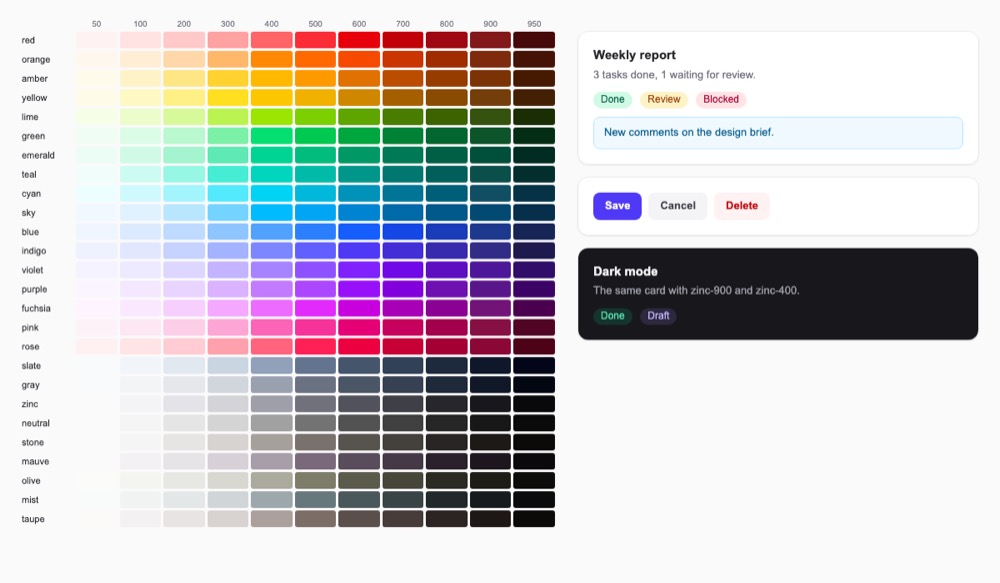
The default Tailwind CSS color palette: 26 hues in 11 shades each (including taupe, mauve, mist and olive in tailwindcss 4.3.5), defined as OKLCH CSS variables in the MIT-licensed framework.
Color palettes and gradients Code libraryOpen source
1. Price: tailwindcss.com/docs/colors
Whole palette free; it ships with the tailwindcss package.
tailwindcss.com/docs/colorsNo quote yet: price is read from the official pages.
2. Commercial use: LICENSE on GitHub
“to use, copy, modify, merge, publish, distribute, sublicense, and/or sell copies of the Software”
MIT allows use in paid products; no visible credit is needed.
LICENSE on GitHub3. Credit the author: LICENSE on GitHub
“The above copyright notice and this permission notice shall be included in all copies or substantial portions of the Software.”
No credit on screen. Keep the license notice inside the code you ship.
LICENSE on GitHub4. Agent access: github.com/tailwindlabs/tailwindcss
An agent can install it by itself with npm install tailwindcss. No key or account is needed.
github.com/tailwindlabs/tailwindcssLicense checked Nov 9, 2026 against 1 official page. Tap a verdict to see its source. How we checked Report an error
Tailwind CSS Colors: a ready color palette for sites
Tailwind CSS Colors is the free set of colors that comes with Tailwind CSS, a popular toolkit for styling websites. It has 26 color families, from red and blue to several grays, each in 11 shades from very light (50) to very dark (950). You or your AI assistant pick a color by name, like sky-500, so buttons, labels and dark mode match without a designer.
Where you can use it
Status labels in an app
Give each state its own color family: green for done, amber for waiting, rose for blocked. A light shade for the background and a dark one for the text keeps the label readable.
A dark version of the page
Write a second color for dark mode next to the first one, like a white card that turns dark gray. The page switches when the visitor's system is in dark mode.
Your brand color next to the defaults
Add your own brand colors under a name like midnight, and they work everywhere the built-in colors do.
Matching colors in your own styles
The same colors are also named values you can use in your own style rules, for example a link color in an article. Everything stays in one palette.
The palette on a page without Tailwind Idea
Copy the color values into a plain page or an email template that does not use Tailwind. Keep the license notice with the copied file.
Colors for charts and dashboards Idea
Give each line or bar in a chart its own family at the same shade, like blue-500, emerald-500 and amber-500. They look equally strong and easy to tell apart.
As reported by Tailwind Labs: Every color has 11 steps, from 50 (lightest) to 950 (darkest).
Tailwind CSS Colors popularity
Downloads from api.npmjs.org, stars from GitHub, checked Nov 19, 2026. How the Gid Score is calculated
How to start
Tell your AI assistant
“Use the Tailwind CSS default palette for this page: zinc for text and borders, indigo-600 for the main button, emerald, amber and rose 100/800 for status labels, and add dark: colors for dark mode; write full class names, never build them from variables.”
Or install it yourself. In a Vite project, install Tailwind and its Vite plugin (the docs also cover other setups and a quick in-browser trial).
npm install tailwindcss @tailwindcss/viteShow codeStep 1 or Step 2
Import Tailwind in your main style file; the whole color palette comes with it.
@import "tailwindcss";Use a color name and a shade in a class, such as bg-sky-500 for a background or text-gray-950 for text.
<div class="bg-sky-500 text-white">Hello</div>Mistakes to avoid
Tailwind reads files as plain text, so classes glued together at run time are never generated and the color is missing.
Version 4 no longer finds a JavaScript config file on its own.
Only theme variables create classes, and they must be at the top level.
The Play CDN is for trying things in the browser only.
The palette is defined in OKLCH and the docs copy only the nearest hex.
License
MIT license. Free for personal and paid products under the MIT license, with no visible credit needed. If you copy the file with the color values, keep its short license notice; do not use the Tailwind name or logo as if your product were official.
“to use, copy, modify, merge, publish, distribute, sublicense, and/or sell copies of the Software” LICENSE on GitHub
“The above copyright notice and this permission notice shall be included in all copies or substantial portions of the Software.” LICENSE on GitHub
“to use, copy, modify, merge, publish, distribute, sublicense, and/or sell copies of the Software” LICENSE on GitHub
Passing the color file on is allowed with the MIT notice kept; do not name your product so it looks official.
“You may not use the Tailwind name or logos in any way that could mistakenly imply any official connection with or endorsement of Tailwind Labs Inc.” tailwindcss.com/brand
AllowedWith conditionsNot allowedNot stated or not checked yet
Is Tailwind CSS Colors free for commercial use? The full answer Not legal advice. Check the license page before you ship.
For your agent
License rules tell your agent what it may do with Tailwind CSS Colors. Paste them into your prompt or AGENTS.md.
- Tailwind CSS Colors (Color palettes and gradients). The default Tailwind CSS color palette: 26 hues in 11 shades each (including taupe, mauve, mist and olive in tailwindcss 4.3.5), defined as OKLCH CSS variables in the MIT-licensed framework. Price: free; commercial use OK; no credit needed.
  Connect: npm tailwindcss.
  Rule: Keep the MIT copyright notice if you copy the theme.css file itself.
  Rule: Do not use the Tailwind name or logo to imply endorsement (see the Tailwind trademark policy).
License: https://github.com/tailwindlabs/tailwindcss/blob/main/LICENSE (checked 2026-11-09; details: https://agentgid.com/assets/tailwind-css-colors/)Agent installs a package or loads it from a CDN.
npm install tailwindcssColors: Tailwind CSS default palette (MIT)Alternatives
Tailwind CSS Colors This page
Pick Radix Colors when you want 12-step scales built for accessible contrast, with see-through and dark mode versions of every color.
Pick Open Color for a smaller open palette of 13 hues in 10 shades, with downloads for Sass, Less and design apps.
Pick Realtime Colors when you want to try your own text, background and accent colors on a sample website before choosing.
Community collection of multi-color gradients; all data is in one gradients.json file in the GitHub repo, plus a browsing site.
AI palette generator trained on photos, movies and art, with a simple JSON HTTP API that returns 5-color palettes.
Questions
Can I use the Tailwind colors in a paid product or a client site?
Yes. Tailwind CSS is under the MIT license, which allows using, copying and selling copies; keep the license notice if you copy the file itself.
How many shades does each color have?
Eleven, numbered 50, 100, 200 and so on up to 900 and 950; 50 is the lightest and 950 the darkest.
Can I change a built-in color or add my own?
Yes. Define a color with the same name to replace a default one, or a new name to add one; both go in the @theme block of your style file.
Where do I get hex codes?
On the colors page of the docs, shift+click a swatch to copy the nearest hex value; the original values are OKLCH.
Can I make a color see-through?
Yes. Add a slash and a number to the class, like bg-black/75 for 75 percent.