
Open Color
by Heeyeun Jeong (yeun)
Open-source UI colour scheme: 13 hues (gray to orange) in 10 shades each, with downloads for CSS/Sass/Less, Figma, Sketch, Adobe and other tools.
Color palettes and gradients Code library
1. Price: yeun.github.io/open-color
Free under the MIT license.
yeun.github.io/open-colorNo quote yet: price is read from the official pages.
2. Commercial use: LICENSE on GitHub
“to deal in the Software without restriction, including without limitation the rights to use, copy, modify, merge, publish, distribute, sublicense, and/or sell copies of the Software”
MIT allows use in paid products; no visible credit is needed.
LICENSE on GitHub3. Credit the author: LICENSE on GitHub
“The above copyright notice and this permission notice shall be included in all copies or substantial portions of the Software.”
Colors: Open Color (MIT)
LICENSE on GitHub4. Agent access: github.com/yeun/open-color
An agent can install it by itself with npm install open-color. No key or account is needed.
github.com/yeun/open-colorLicense checked Nov 9, 2026 against 2 official pages. Tap a verdict to see its source. How we checked Report an error
Open Color: a ready color set for app screens
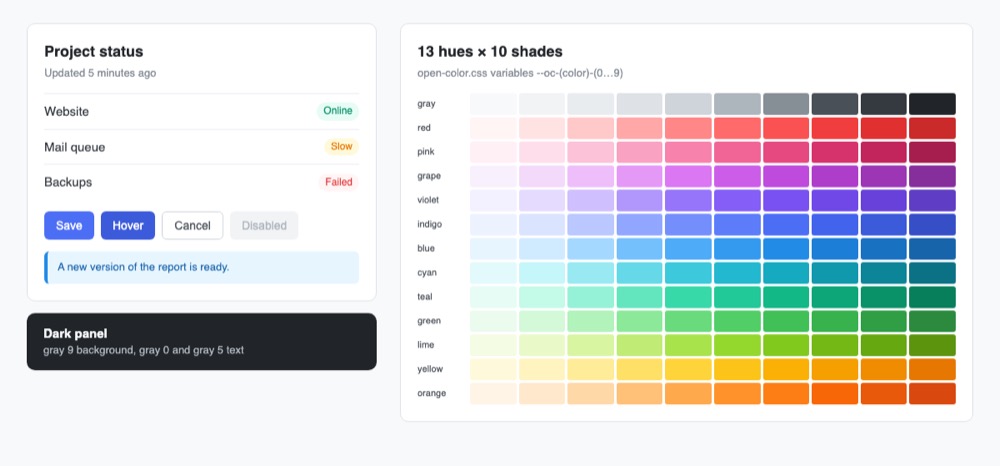
Open Color is a free, ready-made set of colors for websites and apps, made for text, backgrounds, borders and buttons. It has 13 color families from gray to orange, each in 10 shades from light (0) to dark (9). You or your AI assistant paste in one style file and then pick colors by name, such as gray 7 for text.
Where you can use it
Colors for a whole app screen
Give text, backgrounds, lines and buttons colors from one matching set, so every screen looks consistent without picking each color by hand.
Picking the right gray
The project's guide says which gray to use for body text, hints, disabled buttons, dividers and light backgrounds. This settles the most common color questions on a plain page.
Dark panels and dark sections
For a dark block on a light page, the guide suggests the darkest gray as the background and light grays for text, so dark parts match the rest.
The same colors in design tools
Load the same palette into Sketch, Adobe tools, Inkscape or the Mac color picker, so the designs and the finished site use identical colors.
Colors for a Tailwind project
Use the included Tailwind preset so class names like bg-indigo-600 give Open Color shades instead of Tailwind's own.
Status colors for badges and alerts Idea
Use a light shade of teal, yellow or red behind a badge and a dark shade of the same color for its text. This marks states like online, slow and failed.
Open Color popularity
Downloads from api.npmjs.org, stars from GitHub, checked Nov 19, 2026. How the Gid Score is calculated
How to start
Tell your AI assistant
“Install open-color at version 1.9.1, import open-color.css and style the page with its variables, gray 8 for body text, gray 6 for hints, gray 3 for dividers and indigo 6 for primary buttons, keeping our own brand color separate.”
Show codeStep 1 or Step 2
Add the package to your project (or download the style file or a palette for your design tool from the site).
$ npm install open-colorImport the style file and use the color names, written as --oc-(color)-(number) in plain CSS.
@import 'path/open-color.css';

.body {
  background-color: var(--oc-gray-0);
  color: var(--oc-gray-7);
}
Mistakes to avoid
The preset file renames the 0 to 9 shades to Tailwind's 50 to 900 steps.
--oc-blue-6 holds a hex color; the -rgb variables hold the three numbers that rgba() needs.
Only 0 to 9 exist outside the Tailwind preset; a missing CSS variable silently gives no color.
The preset sets theme.colors as a whole, so Tailwind's default color list is replaced.
The project says its colors may change in future versions.
License
MIT license. Free in personal and paid products, and no visible credit is needed. If you ship copies of the Open Color files, keep their copyright and license notice.
“to deal in the Software without restriction, including without limitation the rights to use, copy, modify, merge, publish, distribute, sublicense, and/or sell copies of the Software” LICENSE on GitHub
“The above copyright notice and this permission notice shall be included in all copies or substantial portions of the Software.” LICENSE on GitHub
“Open color is an open-source color scheme Optimized for UI like font, background, border, etc.” yeun.github.io/open-color
“to deal in the Software without restriction, including without limitation the rights to use, copy, modify, merge, publish, distribute, sublicense, and/or sell copies of the Software” LICENSE on GitHub
AllowedWith conditionsNot allowedNot stated or not checked yet
Is Open Color free for commercial use? The full answer Not legal advice. Check the license page before you ship.
For your agent
License rules tell your agent what it may do with Open Color. Paste them into your prompt or AGENTS.md.
- Open Color (Color palettes and gradients). Open-source UI colour scheme: 13 hues (gray to orange) in 10 shades each, with downloads for CSS/Sass/Less, Figma, Sketch, Adobe and other tools. Price: free; commercial use OK; credit required.
  Connect: npm open-color.
  Get files: npm install open-color, or download the CSS/Sass/Less and design-tool palettes from the site.
  Not allowed: Keep the MIT notice in copied files
  Rule: Keep the MIT copyright notice when you ship copies of the Open Color files (colour values themselves are just numbers).
License: https://github.com/yeun/open-color/blob/master/LICENSE (checked 2026-11-09; details: https://agentgid.com/assets/opencolor/)Agent installs a package or loads it from a CDN.
npm install open-colorColors: Open Color (MIT)Alternatives
Open Color This page
Pick Radix Colors when you need 12-step scales with ready dark mode, see-through (alpha) and wide-gamut versions.
Pick Tailwind CSS Colors when the project already uses Tailwind and you want its default 22 hues in 11 shades.
Pick Coolors when you want to generate and save your own palette instead of using a fixed one.
Community collection of multi-color gradients; all data is in one gradients.json file in the GitHub repo, plus a browsing site.
AI palette generator trained on photos, movies and art, with a simple JSON HTTP API that returns 5-color palettes.
Questions
Which gray should I use for body text?
Gray 7 or gray 8. Gray 7 suits menu labels and buttons; gray 8 reads more clearly for long text such as blog posts.
How are the colors named?
By color family and a number from 0 to 9, for example --oc-gray-7 in CSS, $oc-gray-7 in Sass and @oc-gray-7 in Less.
Can I use it in a paid app?
Yes. The MIT license allows use, copying and selling; keep the notice in copies of the Open Color files.
Should I use it for my brand color?
The project does not recommend it, because the colors may change in future versions.