
Pines UI
by DevDojo
Alpine.js + Tailwind CSS UI library of copy-paste elements (menus, modals, tabs, banners, sliders) that work in plain HTML.
Website sections and blocks Open sourceminimal
1. Price: devdojo.com/pines
Fully free.
devdojo.com/pinesNo quote yet: price is read from the official pages.
2. Commercial use: raw.githubusercontent.com
“Permission is hereby granted, free of charge, to any person obtaining a copy of this software and associated documentation files (the "Software"), to deal in the Software without restriction, including without limitation the rights to use, copy, modify, merge, publish, distribute, sublicense, and/or sell copies of the Software”
MIT allows use in paid products without a fee.
raw.githubusercontent.com3. Credit the author: raw.githubusercontent.com
“The above copyright notice and this permission notice shall be included in all copies or substantial portions of the Software.”
No credit on screen. Keep the license notice inside the code you ship.
raw.githubusercontent.com4. Agent access: github.com/thedevdojo/pines
There is no package or API. Files are downloaded by hand from the official site.
github.com/thedevdojo/pinesLicense checked Nov 5, 2026 against 1 official page. Tap a verdict to see its source. How we checked Report an error
Pines UI: copy-paste menus, tabs and pop-ups for plain HTML
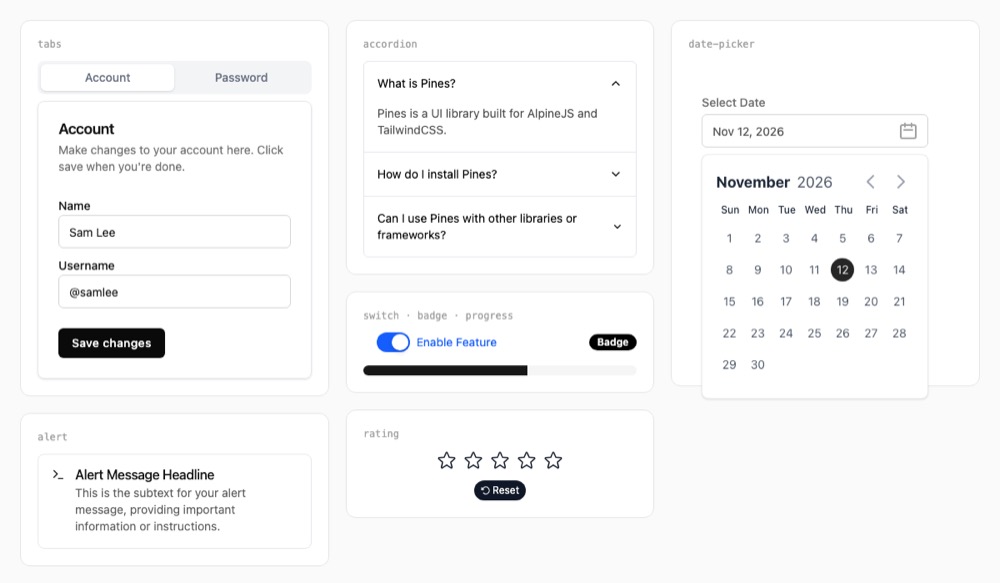
Pines UI is a free collection of 42 ready interface parts, such as tabs, accordions, pop-up windows, date pickers, notices and dropdown menus. You copy a part's code into your page and it works right away. It needs two small helpers on the page, Alpine.js for the clicks and Tailwind CSS for the looks, and no build step.
Where you can use it
Interactive parts on a simple site
Add tabs, an FAQ that opens and closes, or a pop-up window to a static page, a Laravel or a Rails site without moving to a big front-end framework.
Short notices after an action
Show a small message at the top of the screen after someone saves, sends or deletes something, like "Changes saved".
Sign-up and settings forms
Build a settings or account screen from ready tabs, switches, select boxes, date pickers and text fields that already look consistent.
Announcement and cookie banners
Put a banner at the top or bottom of the page for a sale, a launch or a cookie notice, which the visitor can close.
A side panel for details
Open a panel from the side of the screen for a cart, filters or item details, without leaving the page.
Your own reusable tooltip
Turn a part you use often, such as the tooltip, into one short attribute you can put on any element, so changes happen in one place.
As reported by DevDojo: 42 elements in the library.
Pines UI popularity
How to start
Tell your AI assistant
“Add Pines UI elements to my page: tabs for Account and Password, an FAQ accordion and a modal. Load Alpine.js with the collapse and focus plugins and Tailwind at fixed versions, keep x-cloak hidden with CSS, and replace the sample names and images with my own.”
Show code
Load Alpine.js and Tailwind CSS on your page. The docs' quick snippet uses the Tailwind browser script, which is meant for testing, not for a live site.
<!-- Include the Alpine library on your page -->
<script src="//unpkg.com/alpinejs" defer></script>
<!-- Include the TailwindCSS library on your page -->
<script src="https://cdn.tailwindcss.com"></script>
Mistakes to avoid
The modal uses x-trap, which comes from Alpine's focus add-on; the Pines preview page loads both add-ons.
<script src="//unpkg.com/alpinejs" defer> and cdn.tailwindcss.com on the live siteThe docs warn that the Tailwind browser script is not for production apps, and an unpinned script can change under you.
Pines was written for Tailwind 3, where borders defaulted to gray-200; in our demo the borders were black until we added that base style.
Without it, hidden parts flash on screen before Alpine starts; the docs' page template includes it.
License
MIT license. Free to use in personal and paid sites, and you may change and share the code. No visible credit is needed; keep the license notice when you pass the code on.
“Permission is hereby granted, free of charge, to any person obtaining a copy of this software and associated documentation files (the "Software"), to deal in the Software without restriction, including without limitation the rights to use, copy, modify, merge, publish, distribute, sublicense, and/or sell copies of the Software” raw.githubusercontent.com
“The above copyright notice and this permission notice shall be included in all copies or substantial portions of the Software.” raw.githubusercontent.com
“Permission is hereby granted, free of charge, to any person obtaining a copy of this software and associated documentation files (the "Software"), to deal in the Software without restriction, including without limitation the rights to use, copy, modify, merge, publish, distribute, sublicense, and/or sell copies of the Software” raw.githubusercontent.com
“Permission is hereby granted, free of charge, to any person obtaining a copy of this software and associated documentation files (the "Software"), to deal in the Software without restriction, including without limitation the rights to use, copy, modify, merge, publish, distribute, sublicense, and/or sell copies of the Software” raw.githubusercontent.com
AllowedWith conditionsNot allowedNot stated or not checked yet
Is Pines UI free for commercial use? The full answer Not legal advice. Check the license page before you ship.
For your agent
License rules tell your agent what it may do with Pines UI. Paste them into your prompt or AGENTS.md.
- Pines UI (Website sections and blocks, UI kits and website templates, UI animation (Lottie, Rive)). Alpine.js + Tailwind CSS UI library of copy-paste elements (menus, modals, tabs, banners, sliders) that work in plain HTML. Price: free; commercial use OK; no credit needed. Style: minimal.
  Connect: download from https://devdojo.com/pines (no API).
  Get files: Open devdojo.com/pines/docs, copy the HTML with Alpine attributes; include Alpine.js and Tailwind. No account (html).
  Not allowed: Needs Alpine.js and Tailwind CSS
  Rule: Keep the MIT copyright notice in the code if you redistribute it.
  Rule: No visible credit on the site is required by the licence.
License: https://raw.githubusercontent.com/thedevdojo/pines/main/LICENSE.md (checked 2026-11-05; details: https://agentgid.com/assets/pines/)Agent copies the code, snippet or prompt from the page (no account).
Formats: html
UI elements: Pines UI by DevDojo (MIT License)Alternatives
Pines UI This page
Pick Uiverse for single eye-catching buttons, loaders and toggles in plain HTML and CSS, without Alpine.
Pick TW Elements for a larger Tailwind kit with its own JavaScript and page sections, with a paid Pro tier.
Pick Tailblocks for whole page sections such as heroes, pricing and footers rather than small interactive parts.
Official Bootstrap 5 example snippets and layouts: heroes, features, pricing, headers, footers, dashboards; one zip download.
Vue/Nuxt UI library (125+ components, Reka UI + Tailwind) with page-level components and MIT starter templates: landing, SaaS, docs, dashboard.
Questions
Do I need React, Vue or a build tool?
No. The elements are plain HTML with Alpine and Tailwind; for a live site the docs suggest bundling those two, for example with Vite.
Which elements are there?
Among others accordions, modals, date pickers, command palettes, tooltips, marquees, tabs, toasts, banners and slide-over panels.
Can I try an element before copying it?
Yes. Every element in the docs has a live preview and its code, and the Playground lets you edit it in the browser.
Does it work with Laravel or Rails?
Yes. Any site that can load the Alpine and Tailwind scripts can use the elements.
Can I use it in a paid product?
Yes. It is MIT licensed; keep the license notice when you pass the code on.