
Meraki UI
by Khatab Wedaa (Meraki UI)
Free Tailwind CSS v4 components and sections with RTL and dark mode support, plus a few templates; copy the HTML (also Alpine.js variants).
Website sections and blocks Open sourceminimalflat
2. Commercial use: raw.githubusercontent.com
“Permission is hereby granted, free of charge, to any person obtaining a copy of this software and associated documentation files (the "Software"), to deal in the Software without restriction, including without limitation the rights to use, copy, modify, merge, publish, distribute, sublicense, and/or sell copies of the Software”
MIT allows use in paid sites and products.
raw.githubusercontent.com3. Credit the author: raw.githubusercontent.com
“The above copyright notice and this permission notice shall be included in all copies or substantial portions of the Software.”
No credit on screen. Keep the license notice inside the code you ship.
raw.githubusercontent.com4. Agent access: github.com/merakiuilabs/merakiui
There is no package or API. Files are downloaded by hand from the official site.
github.com/merakiuilabs/merakiuiLicense checked Nov 5, 2026 against 1 official page. Tap a verdict to see its source. How we checked Report an error
Meraki UI: free Tailwind sections that work right-to-left
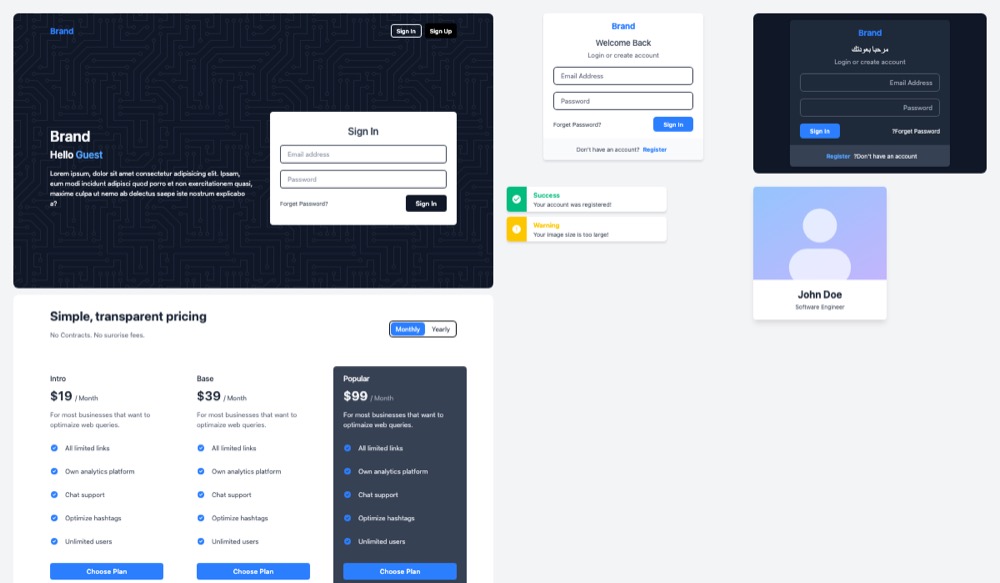
Meraki UI is a free collection of ready page parts, such as sign-in forms, pricing tables, alerts, cards and hero banners. You open a part on the site, copy its HTML and paste it into your page. The parts are styled with Tailwind CSS, have dark versions and also work for right-to-left languages like Arabic and Hebrew.
Where you can use it
Sign-in and sign-up screens
Paste a ready sign-in card or sign-up page into your app, then connect the form to your own login code.
Sites in Arabic or Hebrew
Use the same sections for a site that reads right to left. Set the page direction and the layout flips without a second design.
A dark mode for your site
Each part already carries its dark colors. Switch them on with the visitor's system setting or with your own toggle button.
Pricing and landing sections
Build a product page from hero banners, feature lists, pricing tables, testimonials and footers, then swap in your own text.
Email templates for sign-up mails Idea
Start a welcome or confirmation email from one of the email template sections instead of writing the layout from scratch.
A starting layout for an AI assistant Idea
Give your AI coding assistant one Meraki UI part as the layout to follow, so it fills in your content instead of inventing a new design.
Meraki UI popularity
How to start
Tell your AI assistant
“Build my sign-in page from the Meraki UI "Sign In Card" block: paste its HTML into my Tailwind 4 project, give every border an explicit gray color, replace the Meraki logo with my logo, and add dir="rtl" support for the Arabic version.”
Mistakes to avoid
Tailwind 4 draws plain borders in the text color; in our demo the input borders came out dark.
The *-opacity-* classes were removed in Tailwind 4.
The Play CDN is for trying things out only.
By default Tailwind's dark: classes follow the system setting only.
License
MIT license. Free to use in personal and paid sites, and you may change and share the code. No visible credit is needed; keep the license notice if you pass the code on.
“Permission is hereby granted, free of charge, to any person obtaining a copy of this software and associated documentation files (the "Software"), to deal in the Software without restriction, including without limitation the rights to use, copy, modify, merge, publish, distribute, sublicense, and/or sell copies of the Software” raw.githubusercontent.com
“The above copyright notice and this permission notice shall be included in all copies or substantial portions of the Software.” raw.githubusercontent.com
“Permission is hereby granted, free of charge, to any person obtaining a copy of this software and associated documentation files (the "Software"), to deal in the Software without restriction, including without limitation the rights to use, copy, modify, merge, publish, distribute, sublicense, and/or sell copies of the Software” raw.githubusercontent.com
“Permission is hereby granted, free of charge, to any person obtaining a copy of this software and associated documentation files (the "Software"), to deal in the Software without restriction, including without limitation the rights to use, copy, modify, merge, publish, distribute, sublicense, and/or sell copies of the Software” raw.githubusercontent.com
AllowedWith conditionsNot allowedNot stated or not checked yet
Is Meraki UI free for commercial use? The full answer Not legal advice. Check the license page before you ship.
For your agent
License rules tell your agent what it may do with Meraki UI. Paste them into your prompt or AGENTS.md.
- Meraki UI (Website sections and blocks, UI kits and website templates). Free Tailwind CSS v4 components and sections with RTL and dark mode support, plus a few templates; copy the HTML (also Alpine.js variants). Price: free; commercial use OK; no credit needed. Style: minimal, flat.
  Connect: download from https://merakiui.com (no API).
  Get files: Browse merakiui.com/components, copy the HTML of a section; no account, no package (html).
  Not allowed: Needs Tailwind CSS
  Rule: Keep the MIT copyright notice in the code if you redistribute it.
  Rule: No visible credit on the site is required by the licence.
License: https://raw.githubusercontent.com/merakiuilabs/merakiui/main/LICENSE (checked 2026-11-05; details: https://agentgid.com/assets/meraki-ui/)Agent copies the code, snippet or prompt from the page (no account).
Formats: html
Sections based on Meraki UI (MIT)Alternatives
Meraki UI This page
Pick Tailblocks when you only need whole page sections with seven ready accent colors, also as plain HTML.
Pick TW Elements when you also want working dropdowns, modals and carousels from a Tailwind kit with an installable package.
Pick Bootstrap Examples when your site uses Bootstrap 5 instead of Tailwind.
Vue/Nuxt UI library (125+ components, Reka UI + Tailwind) with page-level components and MIT starter templates: landing, SaaS, docs, dashboard.
Free Bootstrap 5 admin dashboard template (dashboards, forms, tables, auth pages); also React/Angular/Vue ports.
Questions
Do I install a package?
No. You copy the HTML of a part from the site or from the GitHub files into a project that uses Tailwind CSS.
Does it work for Arabic or Hebrew sites?
Yes. The parts are made to work right to left; the site shows each one in LTR and RTL.
Is everything free?
The components are free and MIT licensed. Several of the templates listed on the site cost money.
Can I use it for a client or a paid product?
Yes. It is MIT licensed; no visible credit is required.