Name-based UUIDs with uuid v5
A version 5 UUID is computed from a name and a namespace UUID, so the same inputs always give the same id.
How it works
- Hash a name into a UUID.
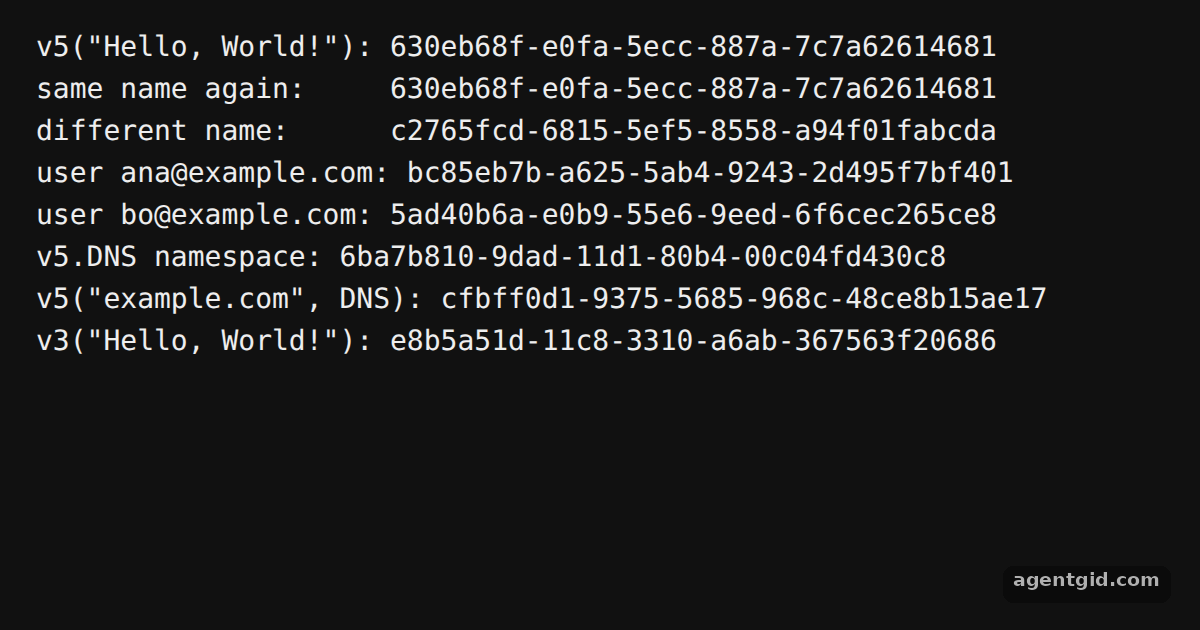
uuidv5(name, namespace)takes any string and your own namespace UUID. The same name prints the same UUID twice, and a different name gives a different one. [1] - Use the built-in namespaces. For domain names the example uses
uuidv5.DNSinstead of a custom namespace. The emails loop shows how to derive stable ids from existing data. [1] - v3 for MD5.
v3is called the same way asv5. It gives a different UUID for the same name and namespace. [1]
Run and edit it
It runs in your browser, in a sandboxed frame that cannot see this site; the packages load from esm.sh only after you press Run.
import { v5 as uuidv5, v3 as uuidv3 } from 'uuid'

// Your own namespace UUID (any fixed UUID works)
const MY_NAMESPACE = '1b671a64-40d5-491e-99b0-da01ff1f3341'

console.log('v5("Hello, World!"):', uuidv5('Hello, World!', MY_NAMESPACE))
console.log('same name again:    ', uuidv5('Hello, World!', MY_NAMESPACE))
console.log('different name:     ', uuidv5('Hello, Moon!', MY_NAMESPACE))

// Stable ids derived from data, e.g. user emails
for (const email of ['ana@example.com', 'bo@example.com']) {
  console.log(`user ${email}:`, uuidv5(email, MY_NAMESPACE))
}

// Built-in RFC namespace for DNS names
console.log('v5.DNS namespace:', uuidv5.DNS)
console.log('v5("example.com", DNS):', uuidv5('example.com', uuidv5.DNS))

// v3 takes the same arguments but hashes with MD5
console.log('v3("Hello, World!"):', uuidv3('Hello, World!', MY_NAMESPACE))
Change "Hello, World!" or an email and the UUID changes; run again with the same text and it stays the same. Code written by AgentGid [1].
Change "Hello, World!" or an email and the UUID changes; run again with the same text and it stays the same. Code written by AgentGid [1].Checked Oct 12, 2026: it starts without errors in Chromium with uuid 14.0.3. Needs WebGL.
More uuid examples
Random UUIDs with uuid v4 Time-based UUIDs with uuid v7 Validating UUIDs with uuid Converting UUIDs to bytes with uuid
Sources
Explanations written by AgentGid from the official docs; the numbers in brackets point here. The code marked "written by AgentGid" is ours and free to copy.