Checking the 72-byte limit with bcryptjs
bcrypt only uses the first 72 bytes of a password. bcryptjs does not reject longer input, so you check it yourself with truncates.
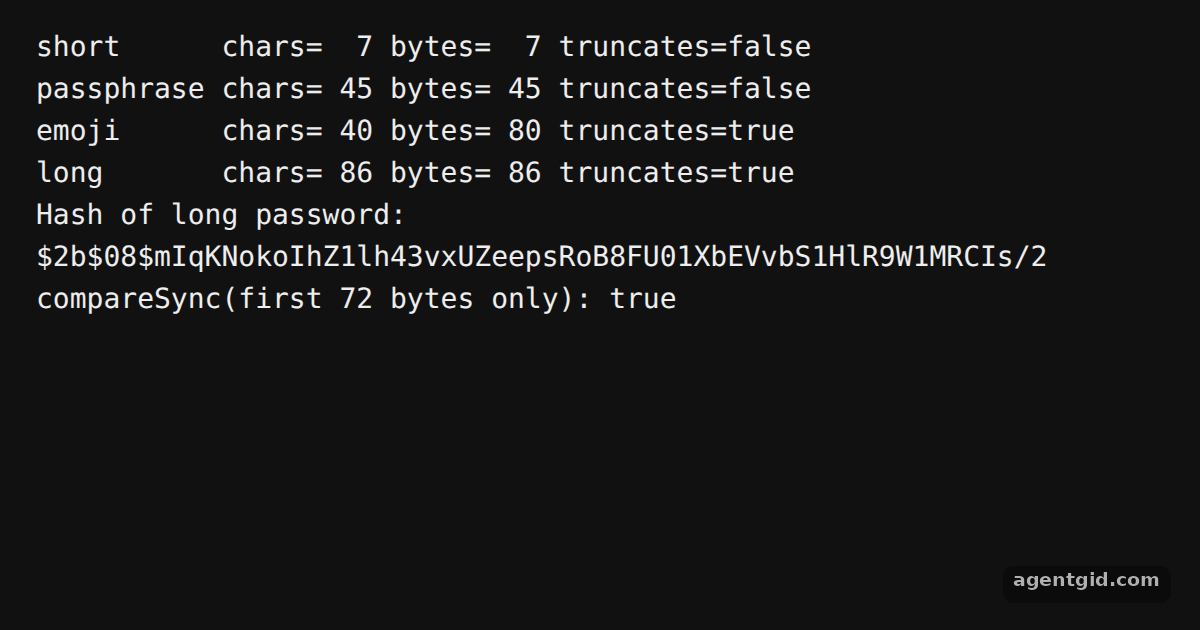
How it works
- Count UTF-8 bytes. The example measures each password with
TextEncoder. Characters like emoji take several bytes, so a short-looking password can still pass the limit. [1] - Call truncates.
bcrypt.truncates(password)returnstruewhen the password is over 72 bytes, and the example prints it for each sample. [1] - Check it yourself. The last lines hash a long password and compare only its first 72 bytes against that hash; in this example the comparison prints
true. That is why the length check belongs in your own validation code. [1]
Run and edit it
It runs in your browser, in a sandboxed frame that cannot see this site; the packages load from esm.sh only after you press Run.
import bcrypt from 'bcryptjs'

const bytes = (s) => new TextEncoder().encode(s).length

const samples = {
  short: 'hunter2',
  passphrase: 'my dog walks to the park every single morning',
  emoji: '🔒'.repeat(20),
  long: 'a'.repeat(72) + '-SECRET-SUFFIX',
}

for (const [name, pw] of Object.entries(samples)) {
  console.log(`${name.padEnd(10)} chars=${String(pw.length).padStart(3)} bytes=${String(bytes(pw)).padStart(3)} truncates=${bcrypt.truncates(pw)}`)
}

// What the extra bytes mean in practice
const hash = bcrypt.hashSync(samples.long, 8)
const first72 = samples.long.slice(0, 72)
console.log('Hash of long password:', hash)
console.log('compareSync(first 72 bytes only):', bcrypt.compareSync(first72, hash))
Edit the samples or make the long password shorter than 72 bytes and see truncates flip to false. Code written by AgentGid [1].
Edit the samples or make the long password shorter than 72 bytes and see truncates flip to false. Code written by AgentGid [1].Checked Oct 12, 2026: it starts without errors in Chromium with bcryptjs 3.0.3. Needs WebGL.
More bcryptjs examples
Hashing and checking a password with bcryptjs Synchronous hashing in bcryptjs Salt rounds and cost in bcryptjs Hash progress and callbacks in bcryptjs
Sources
Explanations written by AgentGid from the official docs; the numbers in brackets point here. The code marked "written by AgentGid" is ours and free to copy.