Textures.js
by Riccardo Scalco
JavaScript library for creating SVG patterns, built on d3.js for data visualization.
Backgrounds, patterns and shapes Code libraryOpen source
1. Price: riccardoscalco.it/textures
Free open-source library under the MIT license.
riccardoscalco.it/texturesNo quote yet: price is read from the official pages.
2. Commercial use: github.com/riccardoscalco/textures
“## License MIT”
MIT allows use in paid products.
github.com/riccardoscalco/textures3. Credit the author: github.com/riccardoscalco/textures
“## License MIT”
No credit on screen. Keep the license notice inside the code you ship.
github.com/riccardoscalco/textures4. Agent access: github.com/riccardoscalco/textures
An agent can install it by itself with npm install textures. No key or account is needed.
github.com/riccardoscalco/texturesLicense checked Nov 9, 2026 against 1 official page. Tap a verdict to see its source. How we checked Report an error
Textures.js: striped and dotted fills for charts
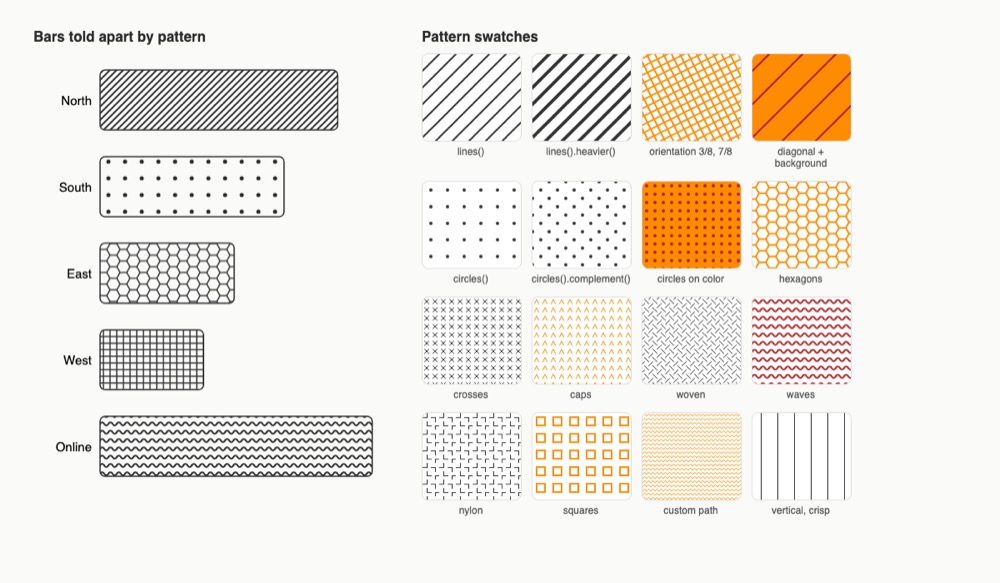
Textures.js is a small free code library that fills shapes with patterns such as stripes, dots, hexagons or waves instead of flat color. It is made for charts and maps drawn with the D3 toolkit, so groups can be told apart by pattern as well as by color. The patterns are SVG drawings and stay sharp at any size.
Where you can use it
Bars told apart by pattern
Give each group in a bar or pie chart its own stripe, dot or grid fill, so readers can tell the groups apart even when colors look alike.
Show more and less with pattern size
Show an order, such as low, medium and high, with the same pattern in growing sizes. This works for heat levels on a map or risk levels in a table.
More groups with color plus pattern
When a chart has more groups than you have good colors, mix a few colors with a few patterns to get many clear combinations.
Your own pattern shape
Draw a small shape of your own, such as a zigzag or a chevron, and repeat it as a fill that matches your brand.
Charts that print in black and white Idea
Reports and handouts that may be printed without color keep their meaning, because each group has its own pattern.
Hatched areas on a map Idea
Mark areas on a map, such as flood zones or regions without data, with stripes over the normal map colors.
Textures.js popularity
Downloads from api.npmjs.org, stars from GitHub, checked Nov 17, 2026. How the Gid Score is calculated
How to start
Tell your AI assistant
“Add textures 1.2.3 (pinned) to my D3 chart, give each category its own pattern fill with svg.call(texture) and fill texture.url(), and set a fixed .id() on each texture so the pattern ids stay the same between renders.”
Or install it yourself.
npm install texturesShow codeStep 1 or Step 2
Import it in your code; it needs D3 (or at least d3-selection) on the page to draw.
import textures from 'textures';Make a texture, add it to the svg with call(), then use its url() as the fill of a shape.
const svg = d3
  .select('#example')
  .append("svg");

const texture = textures
  .lines()
  .thicker();

svg.call(texture);

svg
  .append('circle')
  .style('fill', texture.url());
Mistakes to avoid
call() is what writes the <pattern> into the svg; url() only returns its address, so the shape stays empty without it.
Without .id() each texture gets a random five-letter id at creation, so the markup changes on every render.
The library only makes SVG patterns, which a canvas cannot use.
<script src="https://unpkg.com/textures@1.2.0/dist/textures.js"> copied from the READMEThe README link points to an older 1.2.0 build and makes every visitor load the file from an outside server.
License
MIT license. Free to use in personal and paid products, and you may change and share the code. When you ship copies of the library, keep its copyright and license notice with them.
“## License MIT” github.com/riccardoscalco/textures
“## License MIT” github.com/riccardoscalco/textures
“## License MIT” github.com/riccardoscalco/textures
You may copy and pass on the library if the MIT notice goes with it; the patterns it draws in your charts are yours to show.
“The above copyright notice and this permission notice shall be included in all copies or substantial portions of the Software.” LICENSE on GitHub
AllowedWith conditionsNot allowedNot stated or not checked yet
Is Textures.js free for commercial use? The full answer Not legal advice. Check the license page before you ship.
For your agent
License rules tell your agent what it may do with Textures.js. Paste them into your prompt or AGENTS.md.
- Textures.js (Backgrounds, patterns and shapes). JavaScript library for creating SVG patterns, built on d3.js for data visualization. Price: free; commercial use OK; no credit needed.
  Connect: npm textures.
  Get files: npm install textures and use it with d3 (textures.lines(), circles(), paths()); generates SVG patterns (js, svg).
  Rule: Keep the MIT license notice with the library files you ship.
  Rule: Install from npm (textures) or download textures.js locally instead of relying on a CDN at runtime.
  Rule: Use it alongside d3 to generate SVG patterns.
License: https://github.com/riccardoscalco/textures (checked 2026-11-09; details: https://agentgid.com/assets/textures-js/)Agent installs a package or loads it from a CDN.
npm install texturesFormats: js, svg
Patterns: Textures.js (MIT)Alternatives
Textures.js This page
Pick Hero Patterns when you want ready repeating background tiles for page sections, copied as CSS with your color, not fills inside a chart.
Pick Pattern Craft for copy-paste CSS or Tailwind background patterns and gradients without D3 or any script.
Pick Pattern Monster when you want to tune a seamless pattern in a web editor and download it as an SVG or PNG file.
Animated React components, text effects and backgrounds in JS/TS with CSS or Tailwind; install the source with the shadcn CLI or jsrepo.
Zero-dependency WebGL shader components: mesh gradients, grain, dithering, liquid metal, god rays, halftone, fluted glass; React or vanilla JS.
Questions
Do I need D3?
Yes. The library is built on top of D3 and adds its patterns through a D3 selection; the small d3-selection part is enough.
What kinds of patterns are there?
Three families, lines, circles and paths (hexagons, crosses, caps, woven, waves, nylon, squares), plus your own path shape.
Can I change colors and thickness?
Yes. Each texture has settings such as size, strokeWidth, stroke, fill, background and orientation, and heavier, lighter, thicker and thinner.
Can I use it in a paid product?
Yes. It is MIT licensed; keep the license notice with copies of the code.