
React Sounds
by Lukas Schneider
A React library of ready-to-play sound effects with hooks and components, loaded from a CDN or downloaded for self-hosting.
Sound effects Code libraryOpen source
1. Price: reactsounds.com
Free and open source under the MIT license.
reactsounds.comNo quote yet: price is read from the official pages.
2. Commercial use: LICENSE on GitHub
“to use, copy, modify, merge, publish, distribute, sublicense, and/or sell copies of the Software”
The code is MIT; the built-in sounds have no separate license or source statement, so the repository's MIT license is the only one that applies to them.
LICENSE on GitHub3. Credit the author: LICENSE on GitHub
“The above copyright notice and this permission notice shall be included in all copies or substantial portions of the Software.”
No credit on screen. Keep the license notice inside the code you ship.
LICENSE on GitHub4. Agent access: github.com/e3ntity/react-sounds
An agent can install it by itself with npm install react-sounds. No key or account is needed.
github.com/e3ntity/react-soundsLicense checked Nov 4, 2026 against 1 official page. Tap a verdict to see its source. How we checked Report an error
React Sounds: ready click and alert sounds for React
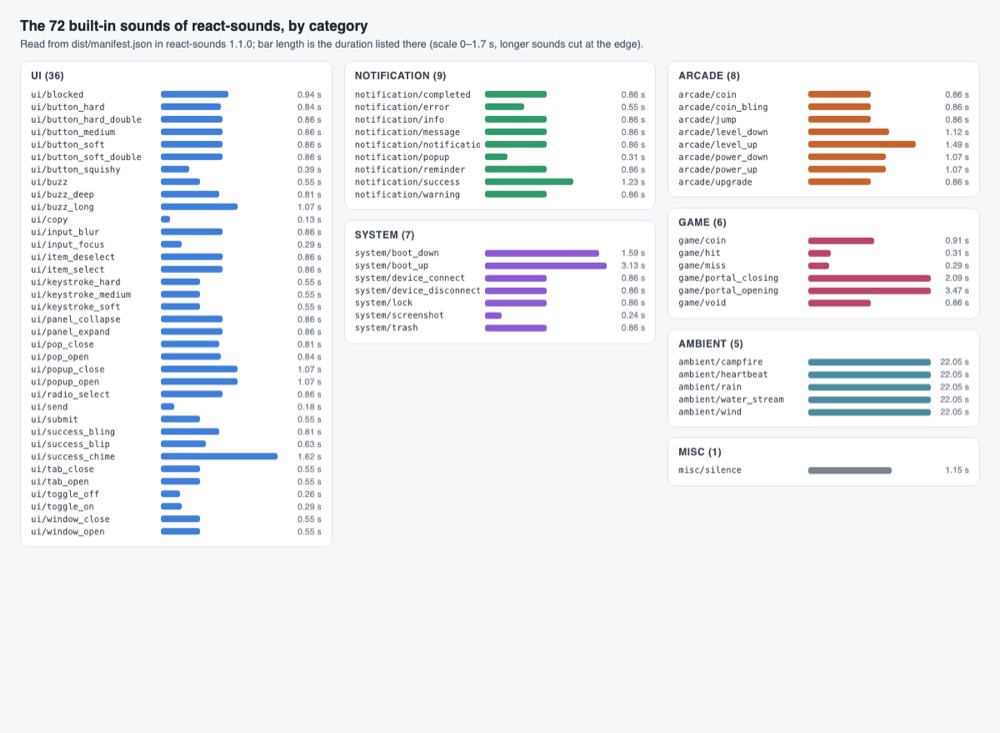
React Sounds is a free code library that plays short ready-made sounds in React apps, such as button clicks, success chimes and game coins. It has 72 built-in sounds that load from the project's own server the first time they play. You or your AI assistant add a sound to a button with a couple of lines.
Where you can use it
Click sound on a button
Give a button, toggle or send action a short sound, so the interface feels more physical.
Alerts for success and errors
Play a chime when a form is saved and a buzz when something fails, next to the visible message.
A sound on/off switch for users
Let people turn all sounds off; the choice is remembered in their browser for the next visit.
Sounds that work offline
Download the sounds you use into your own site, so the app does not depend on the project's server and works without the internet.
Coins and level-ups in a small game Idea
Use the arcade and game sounds, such as coin, jump and level up, for a browser game or a reward screen.
Your own sound files
Play your own sounds, or any sound file on the web, with the same hooks.
As reported by Lukas Schneider: Hundreds of ready-to-play sound effects; 72+ built-in sounds in the comparison table.
React Sounds popularity
GitHub stars stayed at 278 since Nov 7, 2026, so there is no stars chart.
Downloads from api.npmjs.org, stars from GitHub, checked Nov 19, 2026. How the Gid Score is calculated
How to start
Tell your AI assistant
“Add react-sounds 1.1.0 with howler, wrap the app in SoundProvider, play ui/button_soft on the main buttons and notification/success or notification/error after saving, add a Sounds on/off switch with useSoundEnabled, and only use names from the package's dist/manifest.json.”
Or install it yourself.
npm install react-sounds howlerShow code
Play a built-in sound by its name, for example ui/button_soft or notification/success.
const { play } = useSound('ui/button_soft');Mistakes to avoid
The 1.1.0 list of 72 built-in names has no ui/button_1, ui/click or notification/alert; an unknown name is treated as a file path and fails to load.
npm install react-soundsnpm install react-sounds howlerHowler.js is a required peer package.
The hook throws when no provider is above it.
The browser blocks the download otherwise.
License
MIT license. The code is under the MIT License, so it may be used in paid products; keep the copyright notice with copies. The pages do not say where the 72 built-in sounds come from or give them a separate license.
“to use, copy, modify, merge, publish, distribute, sublicense, and/or sell copies of the Software” LICENSE on GitHub
“The above copyright notice and this permission notice shall be included in all copies or substantial portions of the Software.” LICENSE on GitHub
Passing the code on is allowed with the MIT notice; for the sound files alone no separate permission is stated.
“The above copyright notice and this permission notice shall be included in all copies or substantial portions of the Software.” LICENSE on GitHub
AllowedWith conditionsNot allowedNot stated or not checked yet
Is React Sounds free for commercial use? The full answer Not legal advice. Check the license page before you ship.
For your agent
License rules tell your agent what it may do with React Sounds. Paste them into your prompt or AGENTS.md.
- React Sounds (Sound effects). A React library of ready-to-play sound effects with hooks and components, loaded from a CDN or downloaded for self-hosting. Price: free; commercial use OK; no credit needed; shipping inside an app unclear.
  Connect: npm react-sounds.
  Rule: Keep the MIT license file and copyright notice with any copies of the code or sounds you ship.
  Rule: Install the npm package react-sounds (with howler) rather than copying files by hand.
  Rule: Use the included CLI to download sounds for self-hosting if you need offline use or do not want to depend on the CDN.
License: https://github.com/e3ntity/react-sounds/blob/HEAD/LICENSE (checked 2026-11-04; details: https://agentgid.com/assets/react-sounds/)Agent installs a package or loads it from a CDN.
npm install react-soundsSounds: react-sounds (reactsounds.com), MIT LicenseAlternatives
React Sounds This page
Pick Tiks when you want interface sounds made in the browser with no sound files to download, in any framework.
Pick uisfx for 936 interface sounds in 12 styles whose files ship inside the package.
Pick Cuelume for fourteen interface cues made live in the browser and attached to elements by attributes.
Tiny JavaScript sound effects generator (under 1 KB compressed) for games; one zzfx(...) call plays a sound, with a web designer to make new ones and save them as WAV.
Retro game sound effects generator (a JavaScript port of sfxr) with a web app and an npm library to generate, play and export 8-bit style sounds as WAV.
Questions
Can I use it in a paid app?
The code is MIT, which allows use and selling; the built-in sounds have no separate license statement on the pages, so check with the maker before shipping them in a product if that matters to you.
Does it work offline?
Yes, if you download the sounds into your site; it looks for local files first and falls back to the project's server.
Can I load the sounds from my own server?
Yes. setCDNUrl sets where the built-in sound files are loaded from.
Can people turn the sounds off?
Yes. A global on/off setting exists and is saved in the browser.