
Powerline Fonts
by Powerline project (community)
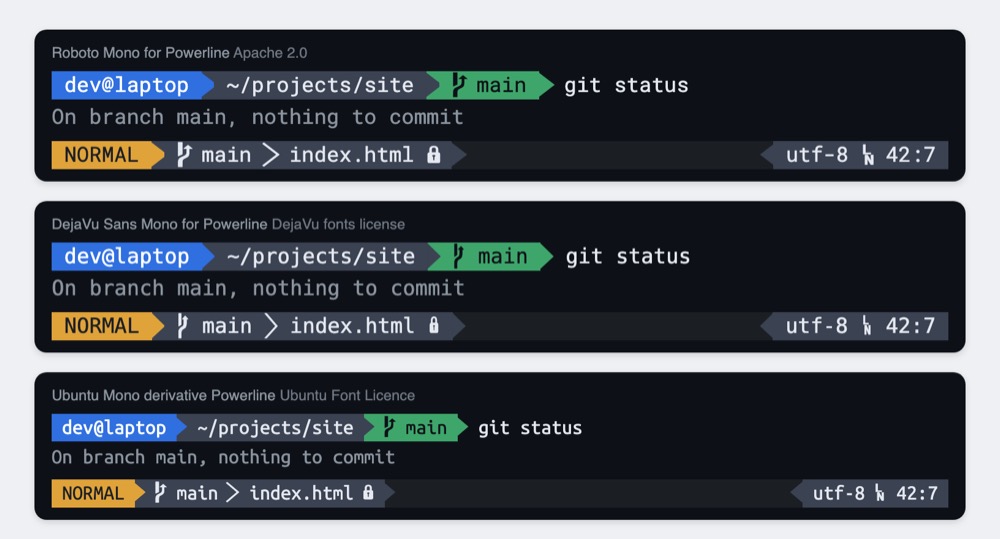
A collection of about 30 monospace programming fonts patched with Powerline status-line glyphs, each under its original font's license.
Fonts Open source
1. Price: github.com/powerline/fonts
All fonts free in the GitHub repo; also packaged as fonts-powerline (Debian/Ubuntu) and powerline-fonts (Fedora).
github.com/powerline/fontsNo quote yet: price is read from the official pages.
2. Commercial use: github.com/powerline/fonts
“Input Mono ... Input's license <http://input.fontbureau.com/license/>”
Depends on the font; the OFL and Apache 2.0 fonts allow it, Monofur is freeware with unclear commercial terms.
github.com/powerline/fonts3. Credit the author: github.com/powerline/fonts
“CPMono_v07 ... Attribution 3.0 Germany (CC BY 3.0 DE)”
CPMono needs credit (CC BY 3.0 DE); Input Mono and Monofur have their own non-open terms, so avoid them in products unless you read those terms.
github.com/powerline/fonts4. Agent access: github.com/powerline/fonts
There is no package or API. Files are downloaded by hand from the official site.
github.com/powerline/fontsLicense checked Nov 5, 2026 against 2 official pages. Tap a verdict to see its source. How we checked Report an error
Powerline Fonts: coding fonts with prompt arrow symbols
Powerline Fonts is a free collection of about 30 popular coding fonts with a few extra symbols added, such as arrow shapes, a branch sign and a lock. Terminal prompts and editor status bars use these symbols to draw colored blocks with pointed ends. Each font keeps its own license, so check the font you pick.
Where you can use it
A shell prompt with arrow blocks
Show your user, folder and code branch as colored blocks with pointed ends in the terminal. Without one of these fonts the arrows show up as empty boxes.
A status bar in Vim
The Powerline plugin draws a bar at the bottom of Vim with the mode, branch, file name and cursor position. It needs a patched font to show its separators.
Install all the fonts at once
On a Mac or Linux computer, one script copies every font of the collection into your user font folder.
Install from the Linux package manager
Debian and Ubuntu, and Fedora, ship the collection as a system package, which is quicker than the script.
Terminal screenshots on a web page Idea
Show a styled terminal prompt in docs or a blog post as real text, with a patched font your page loads. Pick a font whose license allows putting it on a website.
Pick a font for the iTerm2 terminal
On a Mac with iTerm2, choose the patched font for both regular and non-Latin text, or some symbols stay missing.
As reported by Powerline project (community): the Fedora package was tested on version 28.
Powerline Fonts popularity
How to start
Tell your AI assistant
“Install only the Powerline font I use (for example Roboto Mono for Powerline) with ./install.sh "Roboto Mono", set my terminal to it, and tell me its license from the README table before we put it anywhere public.”
Show code
On Debian or Ubuntu install the package; on Fedora use dnf; elsewhere clone the project and run install.sh.
sudo apt-get install fonts-powerlineMistakes to avoid
Otherwise iTerm2 may draw the symbols from another font.
Without an argument the script copies every font of the collection.
The folder holds only a note, no font files.
The script removes the files it knows about.
CPMono is under CC BY 3.0 DE.
License
Varies per font (SIL OFL 1.1, Apache 2.0, MIT, Bitstream/DejaVu, CC BY 3.0 DE, Input license, freeware). There is no single license; each font keeps the license of the original font. Most are open licenses that allow commercial use, but one needs a credit, one is freeware and Input Mono is not included.
“Input Mono ... Input's license <http://input.fontbureau.com/license/>” github.com/powerline/fonts
“CPMono_v07 ... Attribution 3.0 Germany (CC BY 3.0 DE)” github.com/powerline/fonts
“Anonymice Powerline ... SIL Open Font License, Version 1.1; Arimo Powerline ... Apache License, Version 2.0” github.com/powerline/fonts
Each font must travel with its own license file; Monofur only together with its text file.
“These fonts are freeware and can be distributed as long as they are together with this text file.” github.com/powerline/fonts/blob/HEAD/Monofur/LICENSE.txt
AllowedWith conditionsNot allowedNot stated or not checked yet
Is Powerline Fonts free for commercial use? The full answer Not legal advice. Check the license page before you ship.
For your agent
License rules tell your agent what it may do with Powerline Fonts. Paste them into your prompt or AGENTS.md.
- Powerline Fonts (Fonts). A collection of about 30 monospace programming fonts patched with Powerline status-line glyphs, each under its original font's license. Price: free; commercial use with conditions; credit depends on the item; ship inside your app with conditions.
  Connect: download from https://github.com/powerline/fonts (no API).
  Rule: Check the license of the specific font in the README table before use; each patched font keeps its upstream license.
  Rule: OFL fonts (Source Code Pro, Fira Mono, etc.): free for commercial use and embedding, but do not sell the font files alone.
  Rule: CPMono needs credit (CC BY 3.0 DE); Input Mono and Monofur have their own non-open terms, so avoid them in products unless you read those terms.
License: https://github.com/powerline/fonts#font-families (checked 2026-11-05; details: https://agentgid.com/assets/powerline-fonts/)Alternatives
Powerline Fonts This page
Pick Nerd Fonts when your prompt or file manager needs thousands of icons (over 10,000 in our catalog), not just the Powerline arrows.
Pick Cascadia Code for a newer coding font with ligatures that already ships its own Powerline and Nerd Font variants.
Pick Fira Code when you want programming ligatures in a free OFL font.
Open-source typeface family (Sans, Serif, Mono, Condensed, Math) with multi-script support, released under the SIL Open Font License.
Open-source monospace coding font with ligatures, Nerd-Font icons and a CN variant, released under the SIL OFL 1.1.
Questions
Can I use these fonts in a commercial app or website?
It depends on the font. Many are under the SIL Open Font License or Apache 2.0, but CPMono needs credit, Monofur is freeware and Input Mono is not included.
Why does Fira Mono appear as Fura Mono?
The patched version is shipped under the name Fura Powerline, derived from Fira Mono.
How do I remove the fonts again?
Run uninstall.sh from the same version of the project you installed from.
My Linux terminal ignores Terminess Powerline. What now?
Copy the provided fontconfig file to ~/.config/fontconfig/conf.d and run fc-cache -vf.