
p5.brush
by acamposuribe (GitHub)
MIT JavaScript library that adds pencil, charcoal, marker, watercolor-fill and hatching brushes to p5.js 2.x (or standalone WebGL2) for generative art and prints.
Illustrations Code libraryOpen source
1. Price: github.com/acamposuribe/p5.brush
Free and open source (MIT).
github.com/acamposuribe/p5.brushNo quote yet: price is read from the official pages.
2. Commercial use: github.com/acamposuribe/p5.brush/blob/main/LICENSE.md
“to use, copy, modify, merge, publish, distribute, sublicense, and/or sell copies of the Software”
MIT; keep the license notice with copies of the code
github.com/acamposuribe/p5.brush/blob/main/LICENSE.md3. Credit the author: github.com/acamposuribe/p5.brush/blob/main/LICENSE.md
“The above copyright notice and this permission notice shall be included in all copies or substantial portions of the Software.”
No credit on screen. Keep the license notice inside the code you ship.
github.com/acamposuribe/p5.brush/blob/main/LICENSE.md4. Agent access: github.com/acamposuribe/p5.brush
An agent can install it by itself with npm install p5.brush. No key or account is needed.
github.com/acamposuribe/p5.brushLicense checked Nov 25, 2026 against 1 official page. Tap a verdict to see its source. How we checked Report an error
p5.brush: pencil, ink and watercolor marks in code
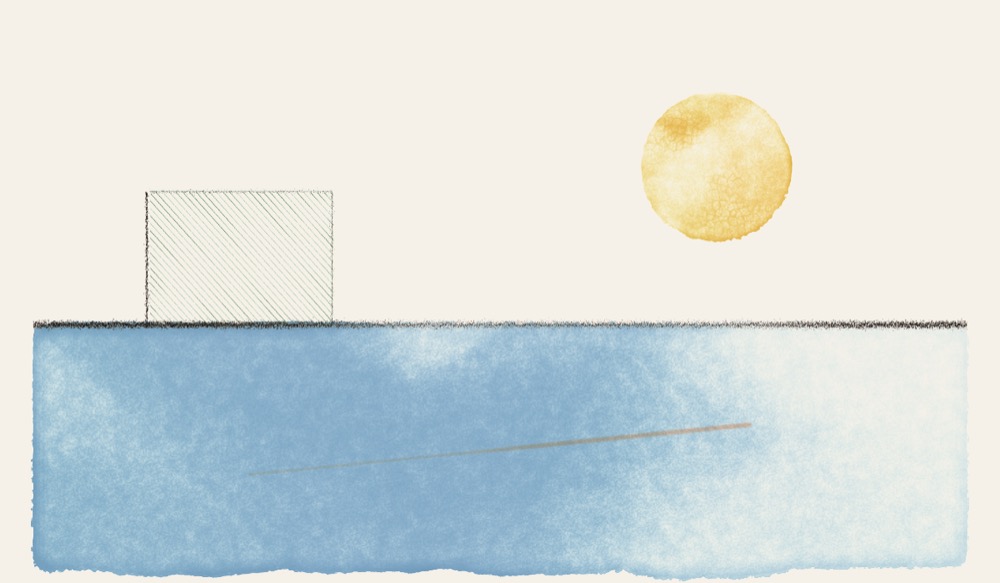
p5.brush is a free drawing library that makes pictures drawn in code look hand-made: pencil and charcoal lines, marker and pen strokes, watercolor fills and hatching. It works on top of p5.js, or on its own in any modern browser, and it is made for generative art and large prints. You may use it in paid products under the MIT license.
Where you can use it
Hand-drawn look for generative art
Give a generative art piece the texture of real pencils, pens and charcoal instead of clean computer lines, for prints or online editions.
Watercolor fills for shapes
Fill circles, rectangles and free shapes with color that spreads, pools and dries like watercolor, so flat shapes look painted.
Shading with hatch lines
Shade areas with even rows of hatch lines at the angle and spacing you choose, like an ink drawing.
Strokes that bend along a flow
Make lines curve and wave on their own by turning on a built-in flow field such as waves, spiral or a gentle hand wobble.
Your own brushes
Design a new brush with its own texture and pressure in the online Brush Maker, then paste the generated code into the sketch.
Sketchy illustrations on a landing page Idea
Draw a hero illustration or section dividers in code with a pencil-and-watercolor look, instead of exporting static images.
p5.brush popularity
Downloads from api.npmjs.org, stars from GitHub, checked Nov 26, 2026. How the Gid Score is calculated
How to start
Tell your AI assistant
“Add p5.brush 3.0.0 to my p5.js 2 sketch, use a WEBGL canvas, and draw a pencil line and a watercolor circle.”
Show codeStep 1 or Step 2
Load p5.js 2.x first, then p5.brush, in this order.
<script src="path_to/p5.min.js"></script>
<script src="path_to/p5.brush.js"></script>
Or install it from npm and import the p5 build (or the standalone build, which needs no p5.js).
npm install p5.brush --save
import * as brush from 'p5.brush'
Mistakes to avoid
The p5 build requires p5.js 2.x and a WEBGL canvas
The two builds have different calls; mixing them breaks the sketch
With p5 and p5.brush as modules, p5 runs in instance mode
The README gives this order
License
MIT license. License. You may use it in paid apps, client work and art for sale, and ship it inside your app; keep the copyright and license notice with copies of the code. No visible credit is needed.
“to use, copy, modify, merge, publish, distribute, sublicense, and/or sell copies of the Software” github.com/acamposuribe/p5.brush/blob/main/LICENSE.md
“The above copyright notice and this permission notice shall be included in all copies or substantial portions of the Software.” github.com/acamposuribe/p5.brush/blob/main/LICENSE.md
“to use, copy, modify, merge, publish, distribute, sublicense, and/or sell copies of the Software” github.com/acamposuribe/p5.brush/blob/main/LICENSE.md
“to use, copy, modify, merge, publish, distribute, sublicense, and/or sell copies of the Software” github.com/acamposuribe/p5.brush/blob/main/LICENSE.md
AllowedWith conditionsNot allowedNot stated or not checked yet
Is p5.brush free for commercial use? The full answer Not legal advice. Check the license page before you ship.
For your agent
License rules tell your agent what it may do with p5.brush. Paste them into your prompt or AGENTS.md.
- p5.brush (Illustrations). MIT JavaScript library that adds pencil, charcoal, marker, watercolor-fill and hatching brushes to p5.js 2.x (or standalone WebGL2) for generative art and prints. Price: free; commercial use OK; no credit needed.
  Connect: npm p5.brush.
  Rule: Keep the MIT copyright and permission notice in copies of the code.
  Rule: Needs p5.js 2.x and a WEBGL canvas (or the standalone build in a WebGL2 browser).
  Rule: Install with npm install p5.brush (README).
License: https://github.com/acamposuribe/p5.brush/blob/main/LICENSE.md (checked 2026-11-25; details: https://agentgid.com/assets/p5-brush/)Agent installs a package or loads it from a CDN.
npm install p5.brushp5.brush, MIT License: keep the LICENSE notice with the code; no credit on screen is neededAlternatives
p5.brush This page
Ready moving gradients and grain textures for page backgrounds, without drawing anything yourself.
Generated low-poly triangle backgrounds as SVG or PNG, a geometric look instead of a hand-drawn one.
Open source library of cute SVG illustrations delivered as React components.
Pack of 100+ gopher characters, goroutines and illustrations about Go, in SVG and PNG with transparent background.
Over 160 hand-drawn doodle illustrations in SVG and PNG, such as clouds, stars, cats and rockets.
Questions
Do I need p5.js?
For the main build, yes, p5.js 2.x with a WEBGL canvas. The standalone build works without p5.js in a browser with WebGL2.
Can I sell art or ship an app made with it?
Yes. It is under the MIT license; keep the license notice with copies of the code.
Can I make my own brush?
Yes. Add one with brush.add(), or design it in the online Brush Maker and paste the code it gives you.
Why does my p5.js 1.x sketch not work with it?
The library needs p5.js 2.x or higher.