
MoviePy
by Zulko / community
MIT Python library for video editing that wraps FFmpeg.
Video assembly and rendering Open source
1. Price: github.com/Zulko/moviepy
Free and open source.
github.com/Zulko/moviepyNo quote yet: price is read from the official pages.
2. Commercial use: github.com/Zulko/moviepy
“MoviePy is open-source software originally written by Zulko and released under the MIT licence.”
MIT allows use in paid products and services.
github.com/Zulko/moviepy3. Credit the author: github.com/Zulko/moviepy/blob/master/LICENCE.txt
github.com/Zulko/moviepy/blob/master/LICENCE.txt4. Agent access: zulko.github.io/moviepy
There is no package or API. Files are downloaded by hand from the official site.
zulko.github.io/moviepyLicense checked Nov 10, 2026 against 3 official pages. Tap a verdict to see its source. How we checked Report an error
MoviePy: edit and assemble videos with Python code
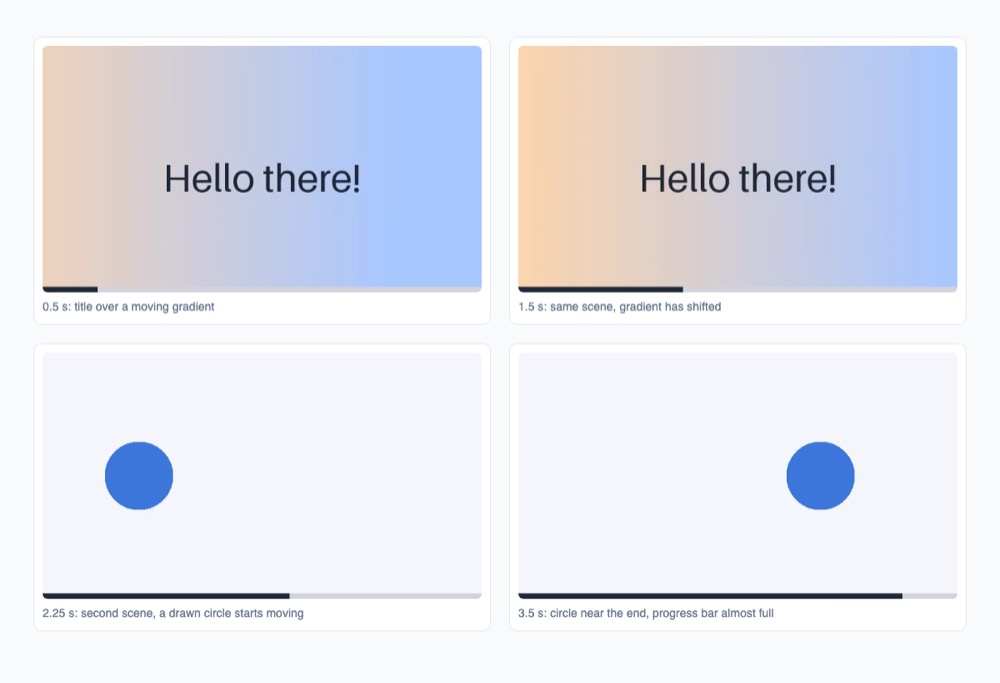
MoviePy is a free Python library that edits video with code instead of a video editor. You or your AI assistant can cut clips, join them, put titles on top and save the result as an MP4 or GIF. It suits jobs that repeat, such as making many similar videos on a server.
Where you can use it
Many similar videos at once
Make a batch of videos from one template, such as a product clip per item or a weekly recap per customer. The script swaps the text and pictures and saves each file.
Titles and captions on a clip
Put a title, a name or a caption over part of a video, for example the first ten seconds of a talk.
Join several clips into one
Glue an intro, the main part and an outro into one file, in a fixed order, without opening an editor.
Preview pictures for videos
Save one still frame from a video as a picture, to use as the cover image on a page or in a list of videos.
Animated GIFs from pictures
Turn a set of screenshots or charts into a short GIF or video, for a help page, a changelog or a social post.
Short clips drawn by code Idea
Make a small animation, like a moving shape or a chart that grows, frame by frame from your own drawing code.
MoviePy popularity
How to start
Tell your AI assistant
“Install moviepy 2.2.1 in a virtual environment and write a script that loads intro.mp4 and main.mp4, joins them with concatenate_videoclips, puts a title over the first 3 seconds and writes out.mp4, using the version 2 names (with_ methods, subclipped, import from moviepy).”
Or install it yourself. The video tool ffmpeg comes along through ImageIO, so there is usually nothing else to install.
pip install moviepyShow codeStep 1 or Step 2
Import what you need straight from moviepy (version 2 has no moviepy.editor any more), load clips, change them and write the result.
from moviepy import * # Simple and nice, the __all__ is set in moviepy so only useful things will be loaded
from moviepy import VideoFileClip # You can also import only the things you really need
To check that MoviePy finds ffmpeg, run its built-in check.
from moviepy.config import check
check()
Mistakes to avoid
Version 2 removed the moviepy.editor module, so old tutorials fail on the first line.
Version 2 renamed the set_ methods to with_, and each returns a changed copy instead of changing the clip in place.
Clips drawn by a function have no length or frame rate until you give them.
In our demo with MoviePy 2.2.1 the bottom of the letters was cut off until we added a margin; the docs say a margin gives an auto-sized text extra room.
In our demo the 2.2.1 package from PyPI still reported "2.1.2" in moviepy.__version__.
License
MIT license. Free to use in personal and paid products and to change and share. Keep the copyright and license notice when you ship copies of the code; the videos you make are yours.
“MoviePy is open-source software originally written by Zulko and released under the MIT licence.” github.com/Zulko/moviepy
“The above copyright notice and this permission notice shall be included in all copies or substantial portions of the Software.” raw.githubusercontent.com
You may copy and share the code if the MIT notice goes with it.
“to use, copy, modify, merge, publish, distribute, sublicense, and/or sell copies of the Software” github.com/Zulko/moviepy/blob/master/LICENCE.txt
AllowedWith conditionsNot allowedNot stated or not checked yet
Is MoviePy free for commercial use? The full answer Not legal advice. Check the license page before you ship.
For your agent
License rules tell your agent what it may do with MoviePy. Paste them into your prompt or AGENTS.md.
- MoviePy (Video assembly and rendering). MIT Python library for video editing that wraps FFmpeg. Price: free; commercial use OK.
  Connect: download from https://github.com/Zulko/moviepy (no API).
  Get files: pip install moviepy.
  Not allowed: Keep the MIT copyright and permission notice in copies.
  Rule: FFmpeg is downloaded automatically by ImageIO on first use; install ffplay only for previews. FFmpeg's licence applies to that component.
License: https://github.com/Zulko/moviepy/blob/master/LICENCE.txt (checked 2026-11-10; details: https://agentgid.com/assets/moviepy/)Video made with MoviePy (MIT)Alternatives
MoviePy This page
Pick Remotion when you build videos as React components; it is free for individuals and companies of up to 3 employees.
Pick Manim for explanatory math or diagram animations made in Python.
Pick HyperFrames when your scenes are already HTML and CSS and you want them rendered into MP4 the same way every time.
Open-source tool that turns a topic or keywords into a short video with script, stock footage, subtitles and background music.
Open-source agentic video production system that plans, generates and assembles videos locally using your own AI agent and provider accounts
Agents that do the same job
From AgentGid's agent catalog, not yet checked as asset sources: their license and price are on their agent pages.
Questions
Do I need to install ffmpeg myself?
Usually not. ImageIO fetches a matching ffmpeg the first time you use MoviePy. Only the ffplay previewer has to be installed by you, and only if you want previews.
Why does my old MoviePy code fail?
Version 2 removed moviepy.editor and renamed the set_ methods to with_ methods; import from moviepy and look for the with_ name.
Which Python version do I need?
Python 3.9 or newer, on Windows, Mac or Linux.
My video does not play in some players. Why?
A common reason is an odd width or height, such as 720x405, with the default codec. Use even sizes.
Can I use it in a paid product?
Yes. It is MIT licensed; keep the license notice with copies of the code.