
Game-icons.net
by Delapouite, Lorc and contributors
CC BY 3.0 game icons as SVG, with an online editor and a GitHub repo.
2D game art and sprites Librarymonochrome
1. Price: game-icons.net
All free.
game-icons.netNo quote yet: price is read from the official pages.
2. Commercial use: game-icons.net/faq.html
“you can use them freely in your projects as long as you credit back the authors.”
Allowed for any purpose, even commercial, with credit to the icon authors.
game-icons.net/faq.html3. Credit the author: game-icons.net/about.html
“It means that you can use them freely as long as you credit the original author in your creation.”
Icons made by {author}. Available on https://game-icons.net (CC BY 3.0)
game-icons.net/about.html4. Agent access: github.com/game-icons/icons
There is no package or API. Files are downloaded by hand from the official site.
github.com/game-icons/iconsLicense checked Oct 22, 2026 against 2 official pages. Tap a verdict to see its source. How we checked Report an error
Game-icons.net: thousands of free icons for games
Game-icons.net is a free collection of over 4,000 one-color icons for games, like swords, potions, chests and dragons, all in one bold style. You download them as sharp vector pictures or as PNG images and pick your own colors. You may use them in paid games and apps, but you must credit the icon's author.
Where you can use it
Items and skills in a video game
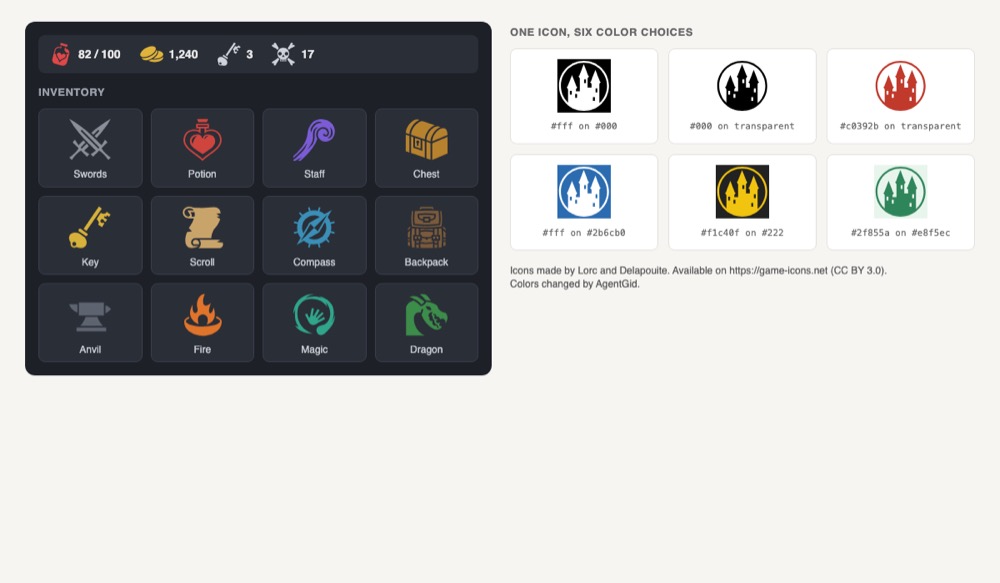
Show weapons, potions, keys and spells in an inventory, a skill tree or the on-screen health and coin counters.
Board games and card games
Put clear symbols on cards, tokens and boards of a tabletop game you print, and credit the authors in the rule book.
Your own colors in a few clicks
Change an icon's color, size and effects in the free online editor called Studio and export it, without any design software.
Stickers, stencils and app icons
Use an icon as a sticker, a stencil or the icon of a small tool; for a website tab icon, turn it into a PNG first.
Credits screen that follows the rules
Add a credits page or menu item that names each icon author and links to game-icons.net, as the license asks.
Badges in a learning app Idea
Reward finished lessons with a trophy, a shield or a star badge so a course or quiz feels like a game.
As reported by Delapouite, Lorc and contributors: 4180 free icons on the site.
Game-icons.net popularity
How to start
Tell your AI assistant
“Use game-icons.net SVG icons for the inventory: copy only the files we use into assets/icons/<author>/, recolor them by replacing fill="#fff" and removing the black square, and add "Icons made by <authors>. Available on https://game-icons.net (CC BY 3.0)" to the credits screen.”
Show code
Add a credit with the author's name, for example on a credits page or in a menu.
Icons made by {author}. Available on https://game-icons.netMistakes to avoid
The license asks for the original author's name in your work.
Each file is a white shape on a black square by default.
The FAQ says the vector format is not widely supported as a favicon.
The script lists files with fd and edits them with sed -i in the GNU style.
Only icons whose author is marked CC0 need no credit.
License
CC BY 3.0 license. Free for any use, including paid games and apps, if you credit the original author of each icon. A few authors put their icons in the public domain, and those need no credit.
“you can use them freely in your projects as long as you credit back the authors.” game-icons.net/faq.html
“It means that you can use them freely as long as you credit the original author in your creation.” game-icons.net/about.html
“If it's a video game, the mention can be accessible from a menu” game-icons.net/faq.html
“They are provided under the CC-BY license (or even Public Domain for some of them), which means that you can use them freely in your projects as long as you credit back the authors.” game-icons.net/faq.html
AllowedWith conditionsNot allowedNot stated or not checked yet
Is Game-icons.net free for commercial use? The full answer Not legal advice. Check the license page before you ship.
For your agent
License rules tell your agent what it may do with Game-icons.net. Paste them into your prompt or AGENTS.md.
- Game-icons.net (2D game art and sprites, Icons). CC BY 3.0 game icons as SVG, with an online editor and a GitHub repo. Price: free; commercial use with conditions; credit required; ship inside your app with conditions; pass the files on to your users only with conditions. Style: monochrome.
  Connect: download from https://game-icons.net (no API).
  Get files: Download SVG per icon from game-icons.net, or clone/zip the GitHub repo game-icons/icons (svg).
  Not allowed: Credit the original icon author (CC BY 3.0)
  Rule: Credit the author, e.g. 'Icons made by {author}. Available on https://game-icons.net'.
License: https://game-icons.net/about.html (checked 2026-10-22; details: https://agentgid.com/assets/game-icons/)Formats: svg
Icons made by {author}. Available on https://game-icons.net (CC BY 3.0)Alternatives
Game-icons.net This page
Pick Kenney when you want CC0 game art packs that need no credit at all.
Pick Superpowers Asset Packs for whole CC0 sets of sprites, backgrounds, sounds and music rather than single icons.
Pick OpenGameArt.org for community game art of every kind, checking each item's own license.
Pixel-art game asset packs on itch.io, some free (e.g. SunnyLand, Legacy Collection) and many paid.
Store selling premium and free 2D and 3D game art: sprites, tilesets, GUI, icons, backgrounds, game kits.
Questions
Can I use these icons in a game I sell?
Yes. The license allows any use, even commercial, as long as you credit the authors.
Where do I put the credit?
On a credit page for a website, in the last pages of the rule book for a board game, and in a menu for a video game.
How do I change the colors?
Use the free online Studio on the site, any vector editor such as Inkscape, or the recolor script in the GitHub project.
Can I use an icon as a website tab icon?
Yes, but turn it into a PNG first; the site says the vector format is not widely supported there.