
Audio Diffusion
by archinet.ai
A PyTorch audio diffusion library for unconditional and text-conditional generation, upsampling, vocoding and autoencoding.
AI music and sound generators Code libraryOpen source
1. Price: github.com/archinetai/audio-diffusion-pytorch
Free MIT-licensed open-source code.
github.com/archinetai/audio-diffusion-pytorchNo quote yet: price is read from the official pages.
2. Commercial use: LICENSE on GitHub
“to use, copy, modify, merge, publish, distribute, sublicense, and/or sell copies of the Software”
MIT allows use in paid products; keep the notice with the code.
LICENSE on GitHub3. Credit the author: LICENSE on GitHub
“The above copyright notice and this permission notice shall be included in all copies or substantial portions of the Software.”
No credit on screen. Keep the license notice inside the code you ship.
LICENSE on GitHub4. Agent access: github.com/archinetai/audio-diffusion-pytorch
An agent can install it by itself with pip install audio-diffusion-pytorch.
github.com/archinetai/audio-diffusion-pytorchLicense checked Oct 22, 2026 against 1 official page. Tap a verdict to see its source. How we checked Report an error
Audio Diffusion: build and train your own sound generator
Audio Diffusion is a free Python code library for people who want to train their own AI that makes sound. It gives the building blocks for making new audio, audio from a text description, and sharper versions of low-quality recordings. It comes with no ready-trained model, so you need your own sound collection and computing time before it makes anything useful.
Where you can use it
A generator trained on your own sounds
Teach a model one kind of sound from your own recordings, such as drum hits or bird calls, and let it make new ones in the same style.
Sound from a text description
Train a model on sounds with short descriptions, then ask for a new sound by describing it in words.
Sharper sound from low-quality audio
Turn a muffled, low-quality recording into a clearer high-quality one, after training on pairs made from good recordings.
Filling a gap in a recording
Mark the parts of a recording you want to keep, and let a trained model fill in the missing or damaged part.
Turning a sound picture back into audio
In a speech or music system that works with spectrograms, use a trained model to turn them back into a sound file.
Sound effects for a small game Idea
Record a few dozen footsteps or clicks, train a small model, and get endless slight variations so effects do not repeat.
Audio Diffusion popularity
Downloads from pypistats.org, stars from GitHub, checked Nov 26, 2026. How the Gid Score is calculated
How to start
Tell your AI assistant
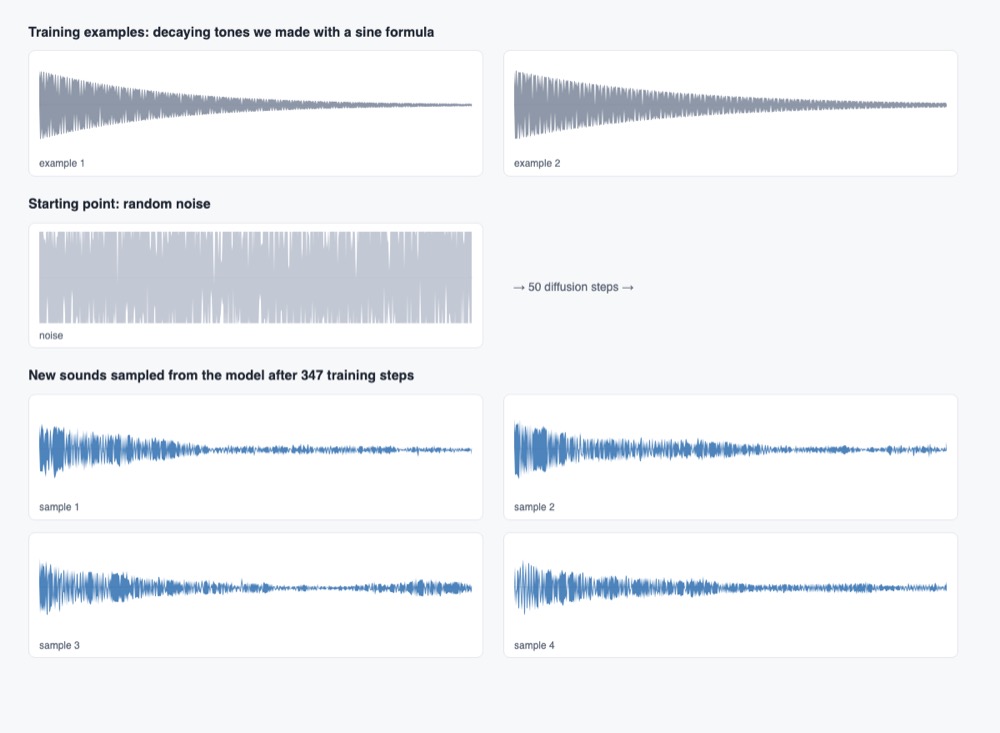
“In a project-local venv, install audio-diffusion-pytorch 0.1.3 with numpy, build a small one-channel DiffusionModel, train it on the WAV files in ./sounds cut to 4096 samples, and save four new samples as WAV files.”
Or install it yourself. It brings PyTorch with it.
pip install audio-diffusion-pytorchShow code
Build a model, train it on your own audio, then turn noise into new audio. The README settings are only a starting point.
# Turn noise into new audio sample with diffusion
noise = torch.randn(1, 2, 2**18) # [batch_size, in_channels, length]
sample = model.sample(noise, num_steps=10) # Suggested num_steps 10-100
Mistakes to avoid
The library ships no trained weights.
pip install transformers as well; the default text encoder is T5-baseText conditioning uses t5-base embeddings from the transformers library.
The autoencoder example imports its encoder from that separate package.
The README settings are untested and large (2**18 samples, 9 levels up to 1024 channels).
In our demo environment torch warned that NumPy was missing, since the library does not install it.
License
MIT License. Free to use, change and share, also in paid products. Keep the copyright and license notice with copies of the code.
“to use, copy, modify, merge, publish, distribute, sublicense, and/or sell copies of the Software” LICENSE on GitHub
“The above copyright notice and this permission notice shall be included in all copies or substantial portions of the Software.” LICENSE on GitHub
“to deal in the Software without restriction, including without limitation the rights to use, copy, modify, merge, publish, distribute, sublicense, and/or sell copies” LICENSE on GitHub
You may copy and share the code with the MIT notice.
“to use, copy, modify, merge, publish, distribute, sublicense, and/or sell copies of the Software” LICENSE on GitHub
AllowedWith conditionsNot allowedNot stated or not checked yet
Is Audio Diffusion free for commercial use? The full answer Not legal advice. Check the license page before you ship.
For your agent
License rules tell your agent what it may do with Audio Diffusion. Paste them into your prompt or AGENTS.md.
- Audio Diffusion (AI music and sound generators). A PyTorch audio diffusion library for unconditional and text-conditional generation, upsampling, vocoding and autoencoding. Price: free; commercial use OK; no credit needed.
  Connect: PyPI audio-diffusion-pytorch.
  Rule: Keep the MIT license and copyright notice in all copies or substantial portions of the code you ship.
  Rule: Do not expect pre-trained models: the repo provides none, so you must train your own.
  Rule: Treat the README configs as indicative and untested; see the Moûsai paper for the configs used there.
License: https://github.com/archinetai/audio-diffusion-pytorch/blob/HEAD/LICENSE (checked 2026-10-22; details: https://agentgid.com/assets/audio-diffusion/)Agent installs a package or loads it from a CDN.
pip install audio-diffusion-pytorchBuilt with audio-diffusion-pytorch (MIT)Alternatives
Audio Diffusion This page
Meta AudioCraft (MusicGen, AudioGen)
Pick AudioCraft for ready-trained MusicGen and AudioGen models from Meta, if non-commercial use of the model files is enough.
Pick ACE-Step 1.5 when you want finished songs right away from a trained MIT model, not a toolkit to train your own.
Pick Bark for a ready model that makes speech, music and simple sound effects from text.
Original open lyrics-to-song model (2025) that generates full songs with vocals and accompaniment under Apache-2.0.
3B song generator that turns lyrics and a style prompt into full songs, with an editable melody and chord score.
Questions
Can I make music with it right after installing?
No. It ships no trained model, so you first train one on your own audio.
What can it be trained to do?
Make new audio, make audio from a text description, compress audio, raise its quality, and turn spectrograms into sound.
How many steps should sampling use?
The README suggests 10 to 100 steps; more steps give better quality but take longer.
Can I use it in a paid product?
Yes. It is MIT licensed; keep the license notice with the code.